Auto-segment images using SAM
This notebook creates a 3LC Table with auto-generated segmentation masks from SAM using grid-based point prompting.
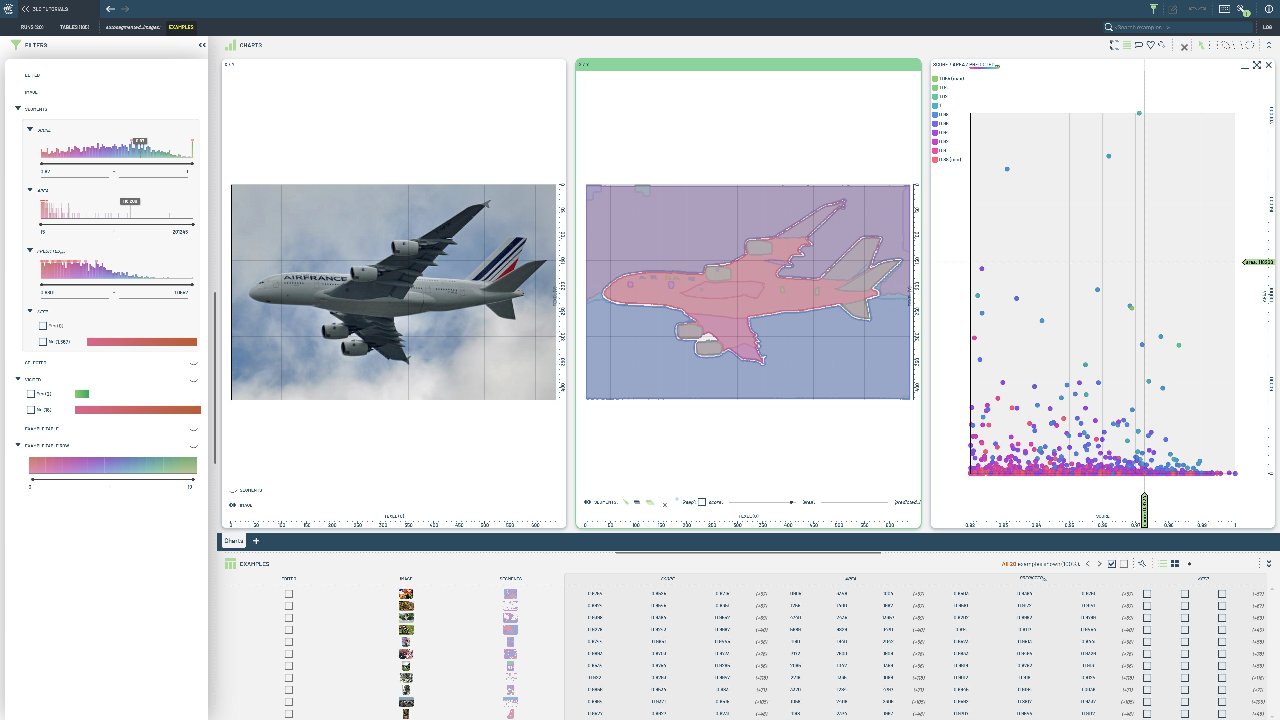
Unlike the bounding box-based approach, this method automatically discovers objects in images without requiring ground truth annotations.
Project Setup
[ ]:
PROJECT_NAME = "3LC Tutorials - COCO128"
DATASET_NAME = "AutoSegmented Images"
TABLE_NAME = "autosegmented_images"
MODEL_TYPE = "vit_b"
TMP_PATH = "../../transient_data"

# Image dataset configuration
DATA_PATH = "../../data"
MAX_IMAGES = 20  # Limit for initial testing - set to None for all images

# Segmentation filtering parameters
MIN_AREA_THRESHOLD = 1000  # Minimum area in pixels to keep a segment
MIN_CONFIDENCE_THRESHOLD = 0.7  # Minimum confidence score to keep a segment
POINTS_PER_SIDE = 32
PRED_IOU_THRESHOLD = 0.88
INSTALL_DEPENDENCIES = True
Install dependencies
[ ]:
if INSTALL_DEPENDENCIES:
    %pip install -q 3lc
    %pip install -q git+https://github.com/3lc-ai/3lc-examples.git
    %pip install -q git+https://github.com/facebookresearch/segment-anything
    %pip install -q matplotlib
Imports
Load Images
[ ]:
# Get list of image files
image_dir = (Path(DATA_PATH) / "coco128" / "images").resolve()
image_extensions = {".jpg", ".jpeg", ".png", ".bmp", ".tiff"}
image_files = [f for f in image_dir.glob("*") if f.suffix.lower() in image_extensions]

if MAX_IMAGES is not None:
    image_files = image_files[:MAX_IMAGES]

print(f"Found {len(image_files)} images to process")
print(f"Sample images: {[f.name for f in image_files[:5]]}")
Initialize SAM Automatic Mask Generator
We’ll use SAM’s SamAutomaticMaskGenerator which uses automatic point grid prompting to segment all objects in each image without requiring any input prompts.
[ ]:
# Download checkpoint

model_url = "https://dl.fbaipublicfiles.com/segment_anything/sam_vit_b_01ec64.pth"
# Download the SAM model checkpoint if it doesn't already exist
checkpoint_path = Path(TMP_PATH) / "sam_vit_b_01ec64.pth"

if not checkpoint_path.exists():
    print(f"Downloading SAM checkpoint to {checkpoint_path}...")
    checkpoint_path.parent.mkdir(parents=True, exist_ok=True)
    response = requests.get(model_url, stream=True)
    total_size = int(response.headers.get("content-length", 0))
    with (
        open(checkpoint_path, "wb") as f,
        tqdm(
            desc="Downloading",
            total=total_size,
            unit="B",
            unit_scale=True,
            unit_divisor=1024,
        ) as bar,
    ):
        for chunk in response.iter_content(chunk_size=8192):
            if chunk:
                f.write(chunk)
                bar.update(len(chunk))
    print("Download completed.")
else:
    print(f"Checkpoint already exists at {checkpoint_path}.")
[ ]:
# Load SAM model
device = infer_torch_device()
sam = sam_model_registry[MODEL_TYPE](checkpoint=checkpoint_path)
sam.to(device=device)

# Initialize the automatic mask generator
mask_generator = SamAutomaticMaskGenerator(
    model=sam,
    points_per_side=POINTS_PER_SIDE,  # Grid size for point prompts
    pred_iou_thresh=PRED_IOU_THRESHOLD,  # IoU threshold for mask quality filtering
    stability_score_thresh=0.92,  # Stability score threshold
    crop_n_layers=1,  # Number of crop layers
    crop_n_points_downscale_factor=2,  # Downscale factor for crop points
    min_mask_region_area=MIN_AREA_THRESHOLD,  # Minimum area in pixels
)

print(f"Initialized SAM Automatic Mask Generator on device: {device}")
print(f"Using model type: {MODEL_TYPE}")
print(f"Checkpoint: {checkpoint_path}")
Process Images and Generate Masks
[ ]:
# Process each image and collect segmentations
segmentations_data = []

for image_path in tqdm(image_files, desc="Processing images", total=len(image_files)):
    # Load image
    image = cv2.imread(str(image_path))
    image_rgb = cv2.cvtColor(image, cv2.COLOR_BGR2RGB)

    # Generate masks for this image
    masks = mask_generator.generate(image_rgb)

    if masks:
        # Convert masks to the format expected by 3LC
        h, w = image_rgb.shape[:2]

        # Stack all masks for this image into a single array
        mask_array = np.stack([mask["segmentation"] for mask in masks], axis=2).astype(np.uint8)

        # Create instance properties (scores, areas, etc.)
        instance_properties = {
            "score": [mask["stability_score"] for mask in masks],
            "area": [mask["area"] for mask in masks],
            "predicted_iou": [mask["predicted_iou"] for mask in masks],
            "keep": [False] * len(masks),
        }

        segmentation_data = {
            "image_height": h,
            "image_width": w,
            "masks": mask_array,
            "instance_properties": instance_properties,
        }

        row_data = {
            "image": tlc.Url(image_path).to_relative().to_str(),
            "segments": segmentation_data,
        }

        segmentations_data.append(row_data)

print(f"\\nProcessed {len(segmentations_data)} images with valid segmentations")
Create 3LC Table
[ ]:
# Create the 3LC table with auto-generated segmentations
table_writer = tlc.TableWriter(
    project_name=PROJECT_NAME,
    dataset_name=DATASET_NAME,
    table_name=TABLE_NAME,
    schema={
        "image": tlc.schemas.ImageSchema(sample_type="url"),
        "segments": tlc.data_types.SegmentationMasks.schema(
            per_instance_schemas={
                "score": tlc.schemas.ConfidenceSchema(writable=False),
                "area": tlc.schemas.Int32Schema(writable=False),
                "predicted_iou": tlc.schemas.IoUSchema(writable=False),
                "keep": tlc.schemas.BoolSchema(),
            },
        ),
    },
)

# Add all the segmentation data to the table
for row_data in segmentations_data:
    table_writer.add_row(row_data)

# Finalize the table
table = table_writer.finalize()

print(f"\nCreated 3LC table: {table.name}")
print(f"Table URL: {table.url}")
print(f"Total rows: {len(table)}")

# Display some statistics
total_segments = sum(len(row["segments"]["instance_properties"]["score"]) for row in segmentations_data)
avg_segments_per_image = total_segments / len(segmentations_data) if segmentations_data else 0

print("\nSegmentation Statistics:")
print(f"Total segments collected: {total_segments}")
print(f"Average segments per image: {avg_segments_per_image:.1f}")
Visualize Sample Results
[ ]:
import matplotlib.pyplot as plt

if len(table) > 0:
    # Get a sample from the table
    sample_idx = 0
    sample = table[sample_idx]

    # Load the original image
    image_path = sample["image"]
    image = cv2.imread(image_path)
    image_rgb = cv2.cvtColor(image, cv2.COLOR_BGR2RGB)

    # Get the segmentation masks
    masks = sample["segments"].masks
    scores = sample["segments"].per_instance_extras["score"]
    areas = sample["segments"].per_instance_extras["area"]

    print(f"Sample image: {Path(image_path).name}")
    print(f"Number of segments: {masks.shape[2]}")
    print(f"Score range: {min(scores):.3f} - {max(scores):.3f}")
    print(f"Area range: {min(areas)} - {max(areas)} pixels")

    # Create visualization
    fig, axes = plt.subplots(1, 3, figsize=(18, 6))

    # Original image
    axes[0].imshow(image_rgb)
    axes[0].set_title("Original Image")
    axes[0].axis("off")

    # All masks overlay
    axes[1].imshow(image_rgb)
    combined_mask = np.zeros((masks.shape[0], masks.shape[1]))
    colors = plt.cm.tab20(np.linspace(0, 1, min(20, masks.shape[2])))

    for i in range(min(masks.shape[2], 20)):  # Show up to 20 masks
        mask = masks[:, :, i]
        if mask.sum() > 0:
            # Create colored overlay
            colored_mask = np.zeros((*mask.shape, 4))
            colored_mask[mask == 1] = colors[i % len(colors)]
            axes[1].imshow(colored_mask, alpha=0.7)

    axes[1].set_title(f"All Segments Overlay ({min(masks.shape[2], 20)} shown)")
    axes[1].axis("off")

    # Individual high-quality masks
    axes[2].imshow(image_rgb)
    # Show only the top 5 masks by score
    top_indices = sorted(range(len(scores)), key=lambda i: scores[i], reverse=True)[:5]

    for i, mask_idx in enumerate(top_indices):
        mask = masks[:, :, mask_idx]
        if mask.sum() > 0:
            colored_mask = np.zeros((*mask.shape, 4))
            colored_mask[mask == 1] = colors[i % len(colors)]
            axes[2].imshow(colored_mask, alpha=0.8)

    axes[2].set_title("Top 5 Segments by Score")
    axes[2].axis("off")

    plt.tight_layout()
    plt.show()
else:
    print("No images processed successfully")
[ ]: