Fine-tuning a model with the 🤗 3LC Trainer
This notebook demonstrates how to use the 3LC Hugging Face Trainer integration to fine-tune a BERT model (bert-base-uncased).
[ ]:
PROJECT_NAME = "3LC Tutorials - Hugging Face BERT"
RUN_NAME = "finetuning-run"
DESCRIPTION = "Fine-tune BERT on MRPC"
TRAIN_DATASET_NAME = "hugging-face-train"
VAL_DATASET_NAME = "hugging-face-val"
CHECKPOINT = "bert-base-uncased"
DEVICE = None
TRAIN_BATCH_SIZE = 64
EVAL_BATCH_SIZE = 256
EPOCHS = 5
NUM_WORKERS = 4
OPTIMIZER = "adamw_torch"
TMP_PATH = "../../transient_data"
INSTALL_DEPENDENCIES = True
[ ]:
if INSTALL_DEPENDENCIES:
    %pip install -q scikit-learn
    %pip install -q 3lc[huggingface]
[ ]:
import os

import datasets
import evaluate
import numpy as np
import tlc
import torch
from transformers import AutoModelForSequenceClassification, AutoTokenizer, DataCollatorWithPadding, TrainingArguments

os.environ["TRANSFORMERS_NO_ADVISORY_WARNINGS"] = "true"  # Removing BertTokenizerFast tokenizer warning

datasets.utils.logging.disable_progress_bar()
[ ]:
if DEVICE is None:
    if torch.cuda.is_available():
        DEVICE = "cuda"
    elif torch.backends.mps.is_available():
        DEVICE = "mps"
    else:
        DEVICE = "cpu"
Initialize a 3LC Run
We initialize a Run with a call to tlc.init, and add the configuration to the Run object.
[ ]:
With the 3LC integration, you can use tlc.Table.from_hugging_face_hub() as a drop-in replacement for datasets.load_dataset() to create a tlc.Table. Notice .latest(), which gets the latest version of the 3LC dataset.
[ ]:
tlc_train_dataset = tlc.Table.from_hugging_face_hub(
    path="glue",
    name="mrpc",
    split="train",
    project_name=PROJECT_NAME,
    dataset_name=TRAIN_DATASET_NAME,
    if_exists="overwrite",
)

tlc_val_dataset = tlc.Table.from_hugging_face_hub(
    path="glue",
    name="mrpc",
    split="validation",
    project_name=PROJECT_NAME,
    dataset_name=VAL_DATASET_NAME,
    if_exists="overwrite",
)
Table provides a method map to apply both preprocessing and on-the-fly transforms to your data before it is sent to the model.
It is different from huggingface where it generates a new reference of the data directly including the example
[ ]:
tokenizer = AutoTokenizer.from_pretrained(CHECKPOINT)


def tokenize_function_tlc(example):
    return {"label": example["label"], **tokenizer(example["sentence1"], example["sentence2"], truncation=True)}


tlc_tokenized_dataset_train = tlc_train_dataset.with_transform(tokenize_function_tlc)
tlc_tokenized_dataset_val = tlc_val_dataset.with_transform(tokenize_function_tlc)
[ ]:
data_collator = DataCollatorWithPadding(tokenizer=tokenizer)
Here we define our model with two labels
[ ]:
# For demonstration purposes, we use the bert-base-uncased model with a different set of labels than
# it was trained on. As a result, there will be a warning about the inconsistency of the classifier and
# pre_classifier weights. This is expected and can be ignored.
model = AutoModelForSequenceClassification.from_pretrained(CHECKPOINT, num_labels=2)
Setup Metrics Collection
Computing metrics is done by implementing a function which returns per-sample metrics you would like to see in the 3LC Dashboard.
This is different from the original compute_metrics of Huggingface which compute per batch the metrics. Here we want to find results with a granularity of per sample basis.
[ ]:
def compute_tlc_metrics(batch, predictor_output):
    logits = predictor_output.forward.logits
    labels = batch["labels"]

    probabilities = torch.nn.functional.softmax(logits, dim=-1)
    predictions = logits.argmax(dim=-1)
    loss = torch.nn.functional.cross_entropy(logits, labels, reduction="none")
    confidence = probabilities.gather(dim=-1, index=predictions.unsqueeze(-1)).squeeze()

    return {
        "predicted": predictions.cpu().numpy(),
        "loss": loss.cpu().numpy(),
        "confidence": confidence.cpu().numpy(),
    }


id2label = {0: "not_equivalent", 1: "equivalent"}

metrics_collector = tlc.metrics.FunctionalMetricsCollector(
    collection_fn=compute_tlc_metrics,
    schema={
        "predicted": tlc.schemas.CategoricalLabelSchema(display_name="Predicted Label", classes=id2label),
        "loss": tlc.schemas.Float32Schema(display_name="Loss", writable=False),
        "confidence": tlc.schemas.ConfidenceSchema(writable=False),
    },
)
[ ]:
# Add references to the input datasets used by the Run.
run.add_input_table(tlc_train_dataset)
run.add_input_table(tlc_val_dataset)
Train the model with 3LC Trainer
To perform model training, we replace the usual Trainer with the 3LC Trainer and provide the per-sample metrics collection function.
In this example, we still compute the glue MRPC per batch thanks to the compute_metrics method.
We also compute our special per sample tlc metrics thanks to the metrics_collectors method.
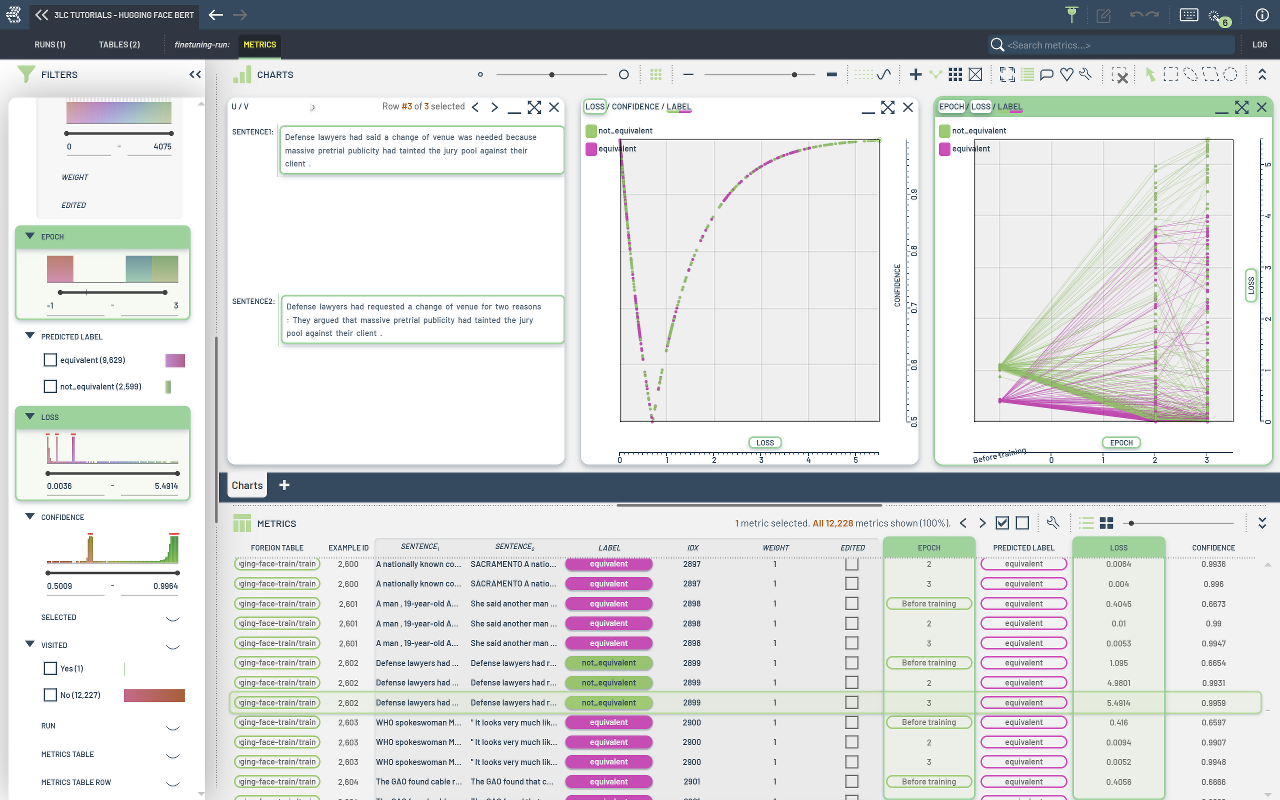
With this, we can choose when to collect the metrics using metrics_collection_epochs. Here we collect at epoch 0 (before training), and at epochs 2 and 3.
We also pass run_name to attach the Trainer to the existing run.
[ ]:
from tlc.integration.hugging_face.trainer import Trainer


def compute_metrics(eval_preds):
    metric = evaluate.load("glue", "mrpc")
    logits, labels = eval_preds
    predictions = np.argmax(logits, axis=-1)
    return metric.compute(predictions=predictions, references=labels)


training_args = TrainingArguments(
    output_dir=TMP_PATH,
    per_device_train_batch_size=TRAIN_BATCH_SIZE,
    per_device_eval_batch_size=EVAL_BATCH_SIZE,
    optim=OPTIMIZER,
    num_train_epochs=EPOCHS,
    report_to="none",  # Disable wandb logging
    use_cpu=DEVICE == "cpu",
    eval_strategy="epoch",
    disable_tqdm=True,
    dataloader_num_workers=NUM_WORKERS,
)

trainer = Trainer(
    model=model,
    args=training_args,
    train_dataset=tlc_tokenized_dataset_train,
    eval_dataset=tlc_tokenized_dataset_val,
    processing_class=tokenizer,
    data_collator=data_collator,
    compute_metrics=compute_metrics,
    metrics_collectors=metrics_collector,
    metrics_collection_epochs=[0] + list(range(2, EPOCHS)),
    run_name=RUN_NAME,
)
[ ]:
trainer.train()
[ ]: