🤗 and 3LC example on the IMDb dataset
This notebook demonstrates fine-tuning a pretrained DistilBERT model from transformers on the IMDb dataset, using the 3LC integrations with Trainer and datasets from Hugging Face. 3LC metrics are collected before and after each epoch of training.
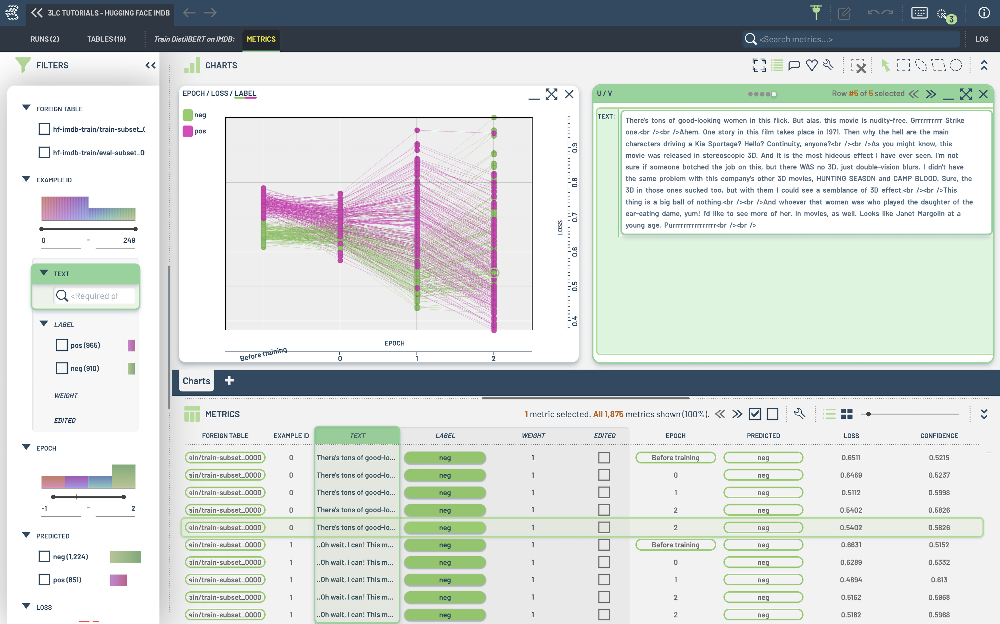
The notebook covers:
Creating a
Tablefrom adatasetsdataset.Fine-tuning a pretrained
transformersmodel on the IMDb dataset with the 3LCTrainer.Using a custom function for metrics collection.
Project Setup
[ ]:
EPOCHS = 5
TRAIN_BATCH_SIZE = 16
EVAL_BATCH_SIZE = 256
TRAIN_DATASET_NAME = "hf-imdb-train"
EVAL_DATASET_NAME = "hf-imdb-test"
TMP_PATH = "../../transient_data"
NUM_WORKERS = 4
DEVICE = None
PROJECT_NAME = "3LC Tutorials - Hugging Face IMDB"
RUN_NAME = "Train DistilBERT on IMDB"
DESCRIPTION = "Example notebook for training a DistilBERT model on the IMDB dataset"
IMDB_MODEL_ID = "distilbert-base-uncased"
LEARNING_RATE = 2e-5
WEIGHT_DECAY = 0.01
INSTALL_DEPENDENCIES = True
[ ]:
if INSTALL_DEPENDENCIES:
    %pip install -q scikit-learn
    %pip install -q "3lc[huggingface]"
    %pip install -q git+https://github.com/3lc-ai/3lc-examples.git
Imports
[ ]:
import os

import datasets
import evaluate
import numpy as np
import tlc
import torch
from transformers import AutoModelForSequenceClassification, AutoTokenizer, DataCollatorWithPadding, TrainingArguments

os.environ["TRANSFORMERS_NO_ADVISORY_WARNINGS"] = "true"  # Removing DistilBertTokenizerFast tokenizer warning

datasets.utils.logging.disable_progress_bar()
[ ]:
if DEVICE is None:
    if torch.cuda.is_available():
        DEVICE = "cuda"
    elif torch.backends.mps.is_available():
        DEVICE = "mps"
    else:
        DEVICE = "cpu"
Initialize a 3LC Run
We initialize a Run with a call to tlc.init, and add the configuration to the Run object.
[ ]:
config = {
    "epochs": EPOCHS,
    "train_batch_size": TRAIN_BATCH_SIZE,
    "eval_batch_size": EVAL_BATCH_SIZE,
    "model": IMDB_MODEL_ID,
    "learning_rate": LEARNING_RATE,
    "weight_decay": WEIGHT_DECAY,
}

run = tlc.init(
    project_name=PROJECT_NAME,
    run_name=RUN_NAME,
    description=DESCRIPTION,
    parameters=config,
    if_exists="overwrite",
)
With the 3LC integration, you can use tlc.Table.from_hugging_face_hub() as a drop-in replacement for datasets.load_dataset() to create a tlc.Table. Notice .latest(), which gets the latest version of the 3LC dataset.
[ ]:
train_dataset = tlc.Table.from_hugging_face_hub(
    "stanfordnlp/imdb",
    split="train",
    project_name=PROJECT_NAME,
    dataset_name=TRAIN_DATASET_NAME,
    description="IMDB train dataset",
    if_exists="overwrite",
)

eval_dataset = tlc.Table.from_hugging_face_hub(
    "stanfordnlp/imdb",
    split="test",
    project_name=PROJECT_NAME,
    dataset_name=EVAL_DATASET_NAME,
    description="IMDB test dataset",
    if_exists="overwrite",
)
You can use the data produced by these Tables like you would with a 🤗 dataset.
[ ]:
train_dataset_hf = datasets.load_dataset("stanfordnlp/imdb", split="train")
train_dataset_hf[0]
[ ]:
[ ]:
from tlc_tools.split import split_table

splits = split_table(
    train_dataset, splits={"train-subset": 0.01, "eval-subset": 0.005, "dontcare": 0.985}, if_exists="rename"
)

train_dataset = splits["train-subset"]
eval_dataset = splits["eval-subset"]
Table provides a method map to apply both preprocessing and on-the-fly transforms to your data before it is sent to the model.
[ ]:
tokenizer = AutoTokenizer.from_pretrained(IMDB_MODEL_ID, model_max_length=512)


def tokenize(sample):
    return {"label": sample["label"], **tokenizer(sample["text"], truncation=True)}
[ ]:
train_tokenized = train_dataset.with_transform(tokenize)
eval_tokenized = eval_dataset.with_transform(tokenize)
[ ]:
data_collator = DataCollatorWithPadding(tokenizer=tokenizer)
[ ]:
id2label = {0: "neg", 1: "pos"}
label2id = {"neg": 0, "pos": 1}

# For demonstration purposes, we use the distilbert-base-uncased model with a different set of labels than
# it was trained on. As a result, there will be a warning about the inconsistency of the classifier and
# pre_classifier weights. This is expected and can be ignored.
model = AutoModelForSequenceClassification.from_pretrained(
    IMDB_MODEL_ID, num_labels=2, id2label=id2label, label2id=label2id
)
Setup Metrics Collection
Computing metrics is done by implementing a function which returns per-sample metrics you would like to see in the 3LC Dashboard.
We keep the metrics function in Hugging Face to see the intermediate aggregate metrics.
For special metrics such as the predicted category we specify that we would like this to be shown as a CategoricalLabel.
[ ]:
accuracy = evaluate.load("accuracy")


def compute_metrics(eval_pred):
    predictions, labels = eval_pred
    predictions = np.argmax(predictions, axis=1)
    return accuracy.compute(predictions=predictions, references=labels)


def compute_tlc_metrics(batch, predictor_output):
    logits = predictor_output.forward.logits
    labels = batch["labels"]

    probabilities = torch.nn.functional.softmax(logits, dim=-1)
    predictions = logits.argmax(dim=-1)
    loss = torch.nn.functional.cross_entropy(logits, labels, reduction="none")
    confidence = probabilities.gather(dim=-1, index=predictions.unsqueeze(-1)).squeeze()

    return {
        "predicted": predictions.cpu().numpy(),
        "loss": loss.cpu().numpy(),
        "confidence": confidence.cpu().numpy(),
    }


metrics_collector = tlc.metrics.FunctionalMetricsCollector(
    collection_fn=compute_tlc_metrics,
    schema={
        "predicted": tlc.schemas.CategoricalLabelSchema(classes=id2label),
        "loss": tlc.schemas.Float32Schema(),
        "confidence": tlc.schemas.ConfidenceSchema(writable=False),
    },
)
Train the model with 3LC Trainer
To perform model training, we replace the usual Trainer with the 3LC Trainer and provide the per-sample metrics collection function. We also specify the epochs at which to collect metrics using metrics_collection_epochs.
[ ]:
from tlc.integration.hugging_face.trainer import Trainer

training_args = TrainingArguments(
    output_dir=TMP_PATH,
    learning_rate=LEARNING_RATE,
    per_device_train_batch_size=TRAIN_BATCH_SIZE,
    per_device_eval_batch_size=EVAL_BATCH_SIZE,
    num_train_epochs=EPOCHS,
    weight_decay=WEIGHT_DECAY,
    report_to="none",
    eval_strategy="epoch",
    use_cpu=DEVICE == "cpu",
    dataloader_num_workers=NUM_WORKERS,
)

trainer = Trainer(
    model=model,
    args=training_args,
    train_dataset=train_tokenized,
    eval_dataset=eval_tokenized,
    processing_class=tokenizer,
    data_collator=data_collator,
    compute_metrics=compute_metrics,
    metrics_collectors=metrics_collector,
    metrics_collection_epochs=list(range(EPOCHS)),
    run_name=RUN_NAME,
)
[ ]:
trainer.train()