Register Augmented Samples From a Training Loop
In this notebook, we will demonstrate how to register augmented samples from a training loop as 3LC metrics.
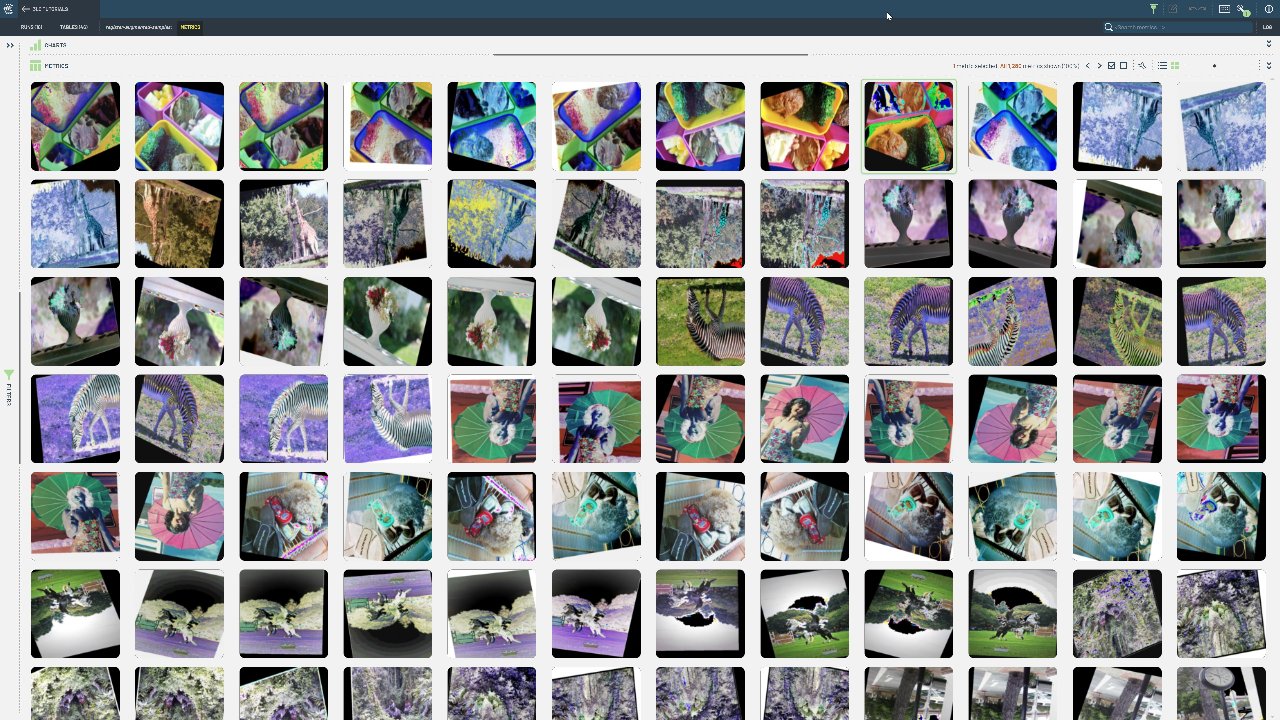
Define some image augmentations
Register a torch dataset as a
tlc.TableCreate a
tlc.Runto store the augmented samplesIterate a number of times through the Table using a dataloader, writing batches of augmented images as 3LC metrics
Project setup
[ ]:
PROJECT_NAME = "3LC Tutorials - Augmentation Explorer"
DATASET_NAME = "COCO128"
TABLE_NAME = "images-only"
RUN_NAME = "register-augmented-samples"
RUN_DESCRIPTION = "Inspecting augmentations on COCO-128"
DATA_PATH = "../../data"
BATCH_SIZE = 32
EPOCHS = 10
INSTALL_DEPENDENCIES = True
Install dependencies
[ ]:
if INSTALL_DEPENDENCIES:
    %pip install -q 3lc
Imports
Define Augmentations and Dataset
[ ]:
from pathlib import Path

augmentations = T.Compose(
    [
        T.Lambda(lambda x: x.convert("RGB")),
        T.RandomAffine(degrees=20, translate=(0.1, 0.1)),
        T.RandomHorizontalFlip(),
        T.RandomVerticalFlip(),
        T.RandomAdjustSharpness(0.5),
        T.RandomAutocontrast(0.5),
        T.RandomEqualize(0.5),
        T.RandomInvert(0.5),
        T.RandomPosterize(4),
        T.RandomSolarize(0.5),
        T.ToImage(),
        T.ToDtype(torch.float32, scale=True),
        T.Resize((128, 128), antialias=True),
    ]
)


image_folder_path = Path(DATA_PATH).absolute() / "coco128"
assert image_folder_path.exists(), f"Path {image_folder_path} does not exist"
Register the Dataset as a Table
[ ]:
table = tlc.Table.from_image_folder(
    image_folder_path,
    table_name=TABLE_NAME,
    dataset_name=DATASET_NAME,
    project_name=PROJECT_NAME,
)
[ ]:
augmented_view = table.with_transform(lambda x: augmentations(x["image"]))
Create a Run and Register Augmented Samples
[ ]:
from torch.utils.data import DataLoader

AUGMENTED_IMAGE_COLUMN_NAME = "augmented_img"

run = tlc.init(
    PROJECT_NAME,
    RUN_NAME,
    description=RUN_DESCRIPTION,
    parameters={"augmentations": str(augmentations)},
    if_exists="overwrite",
)

# Create a metrics table writer to store the augmented images
metrics_writer = tlc.MetricsTableWriter(
    run_url=run.url,
    foreign_table_url=table.url,
    schema={AUGMENTED_IMAGE_COLUMN_NAME: tlc.schemas.ImageSchema()},
)

# Create a data loader over the augmented view. It is important to set shuffle=False to ensure
# we can match the augmented images with the input table rows.
dl = DataLoader(augmented_view, batch_size=BATCH_SIZE, shuffle=False)

for epoch in range(EPOCHS):
    for batch_idx, batch in enumerate(dl):
        # Provide sample indices to identify written metrics-images with rows of the input table
        sample_indices = [batch_idx * BATCH_SIZE + i for i in range(BATCH_SIZE)]

        # Convert the batch to PIL images
        images_batch = [T.ToPILImage()(img) for img in batch]

        # Write the batch to the metrics table
        metrics_writer.add_batch(
            {
                AUGMENTED_IMAGE_COLUMN_NAME: images_batch,
                tlc.constants.EXAMPLE_ID: sample_indices,
                tlc.constants.EPOCH: [epoch] * BATCH_SIZE,  # Add a constant epoch column
            }
        )

# Finalize writes the metrics table to disk
metrics_table = metrics_writer.finalize()

# Ensure the metrics table is associated with the run
run.add_metrics_table(metrics_table)

# Mark the run as completed
run.set_status_completed()