Fine-tune a instance segmentation model using Detectron2
This notebook shows how to collect instance segmentation metrics while training a model using Detectron2.
This notebook is a modified version of the official colab tutorial of detectron which can be found here.
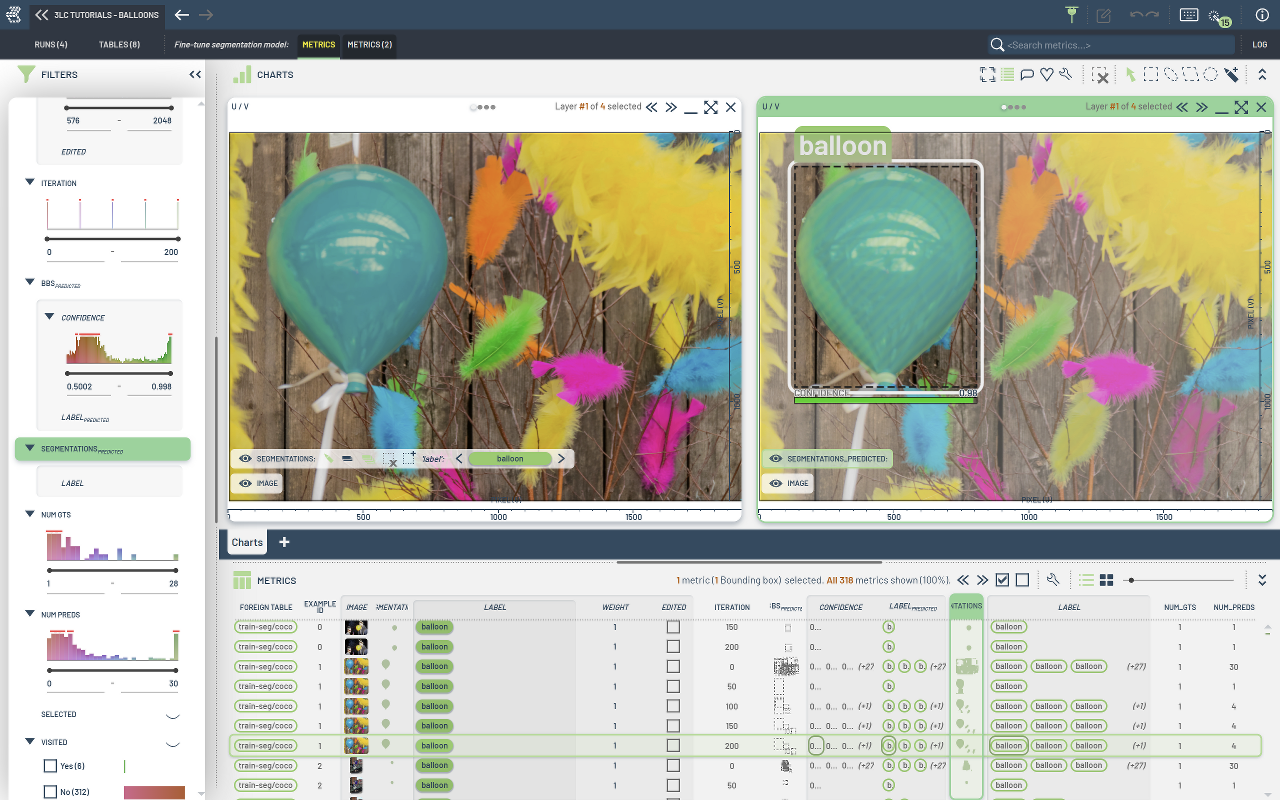
In this tutorial we will see how to fine-tune a pre-trained detectron model for object detection and instance segmentation on a custom dataset in the COCO format. We will integrate with 3LC by creating a training run, registering 3LC datasets, and collecting per-sample instance metrics.
This notebook demonstrates:
Training a detectron2 model on a custom dataset.
Integrating a COCO dataset with 3LC using
register_coco_instances().Collecting per-sample instance metrics using
BoundingBoxMetricsCollector.
Setup project
[ ]:
PROJECT_NAME = "3LC Tutorials - Balloons"
RUN_NAME = "Fine-tune segmentation model"
DESCRIPTION = "Train a balloon segmenter using detectron2"
TRAIN_DATASET_NAME = "balloons-train-seg"
VAL_DATASET_NAME = "balloons-val-seg"
TMP_PATH = "../transient_data"
DATA_PATH = "../../data"
DETECTRON2_MODEL_CONFIG = "COCO-InstanceSegmentation/mask_rcnn_R_50_FPN_3x.yaml"
MAX_ITERATIONS = 200
BATCH_SIZE = 2
MAX_DETECTIONS_PER_IMAGE = 30
SCORE_THRESH_TEST = 0.5
MASK_FORMAT = "bitmask"
INSTALL_DEPENDENCIES = True
Install dependencies
[ ]:
if INSTALL_DEPENDENCIES:
    # NOTE: detectron2 has no suitable prebuilt wheels for Python 3.10+, so we install from source.
    #       This requires a working C++ compiler and may take a few minutes.
    #       See https://detectron2.readthedocs.io/en/latest/tutorials/install.html for details.
    %env CC=gcc-11
    %env CXX=g++-11
    %pip install -q setuptools wheel ninja
    %pip install -q --no-build-isolation git+https://github.com/facebookresearch/detectron2.git
    %pip install -q 3lc
    %pip install -q opencv-python
    %pip install -q matplotlib
Imports
[ ]:
import os
import random
from pathlib import Path

import cv2
import matplotlib.pyplot as plt
import numpy as np
import tlc
from detectron2 import model_zoo
from detectron2.config import get_cfg
from detectron2.data import DatasetCatalog, MetadataCatalog
from detectron2.utils.logger import setup_logger
from detectron2.utils.visualizer import Visualizer

logger = setup_logger()
logger.setLevel("ERROR")
Prepare the dataset
In this section, we show how to train an existing detectron2 model on a custom dataset in the COCO format.
We use the balloon segmentation dataset which only has one class: balloon.
You can find a modified COCO version of this dataset inside the “data” directory provided while cloning our repository.
We’ll train a balloon segmentation model from an existing model pre-trained on COCO dataset, available in detectron2’s model zoo.
Note that COCO dataset does not have the “balloon” category. We’ll be able to recognize this new class in a few minutes.
[ ]:
BALLOONS_ROOT = (Path(DATA_PATH) / "balloons").resolve().absolute()
assert BALLOONS_ROOT.exists()

train_json_path = BALLOONS_ROOT / "train/train-annotations.json"
train_image_folder = BALLOONS_ROOT / "train"
val_json_path = BALLOONS_ROOT / "val/val-annotations.json"
val_image_folder = BALLOONS_ROOT / "val"
Register the dataset with 3LC
Now that we have the dataset in the COCO format, we can register it with 3LC.
[ ]:
from tlc.integration.detectron2 import register_coco_instances

register_coco_instances(
    TRAIN_DATASET_NAME,
    {},
    str(train_json_path),
    str(train_image_folder),
    project_name=PROJECT_NAME,
    task="segment",
    mask_format=MASK_FORMAT,
)

register_coco_instances(
    VAL_DATASET_NAME,
    {},
    str(val_json_path),
    str(val_image_folder),
    project_name=PROJECT_NAME,
    task="segment",
    mask_format=MASK_FORMAT,
)
[ ]:
# The detectron2 dataset dicts and dataset metadata can be read from the DatasetCatalog and
# MetadataCatalog, respectively.
dataset_metadata = MetadataCatalog.get(TRAIN_DATASET_NAME)
dataset_dicts = DatasetCatalog.get(TRAIN_DATASET_NAME)
To verify the dataset is in correct format, let’s visualize the annotations of randomly selected samples in the training set:
[ ]:
from detectron2.utils.file_io import PathManager

for d in random.sample(dataset_dicts, 3):
    filename = tlc.Url(d["file_name"]).to_absolute().to_str()
    if "s3://" in filename:
        with PathManager.open(filename, "rb") as f:
            img = np.asarray(bytearray(f.read()), dtype="uint8")
            img = cv2.imdecode(img, cv2.IMREAD_COLOR)
    else:
        img = cv2.imread(filename)
    visualizer = Visualizer(img[:, :, ::-1], metadata=dataset_metadata, scale=0.5)
    out = visualizer.draw_dataset_dict(d)
    out_rgb = cv2.cvtColor(out.get_image(), cv2.COLOR_BGR2RGB)
    plt.imshow(out_rgb[:, :, ::-1])
    plt.title(filename.split("/")[-1])
    plt.show()
Train!
Now, let’s fine-tune a COCO-pretrained R50-FPN Mask R-CNN model on the balloon dataset. It takes ~2 minutes to train 300 iterations on a P100 GPU.
[ ]:
[ ]:
# For a full list of config values: https://github.com/facebookresearch/detectron2/blob/main/detectron2/config/defaults.py
cfg = get_cfg()
cfg.merge_from_file(model_zoo.get_config_file(DETECTRON2_MODEL_CONFIG))
cfg.DATASETS.TRAIN = (TRAIN_DATASET_NAME,)
cfg.DATASETS.TEST = (VAL_DATASET_NAME,)
cfg.DATALOADER.NUM_WORKERS = 0
cfg.OUTPUT_DIR = TMP_PATH
cfg.MODEL.WEIGHTS = model_zoo.get_checkpoint_url(DETECTRON2_MODEL_CONFIG)  # Let training initialize from model zoo
cfg.SOLVER.IMS_PER_BATCH = BATCH_SIZE  # This is the real "batch size" commonly known to deep learning people
cfg.SOLVER.BASE_LR = 0.00025  # pick a good LR
cfg.SOLVER.MAX_ITER = (
    MAX_ITERATIONS  # Seems good enough for this toy dataset; you will need to train longer for a practical dataset
)
cfg.SOLVER.STEPS = []  # Do not decay learning rate
cfg.MODEL.ROI_HEADS.BATCH_SIZE_PER_IMAGE = (
    128  # The "RoIHead batch size". 128 is faster, and good enough for this toy dataset (default: 512)
)
cfg.MODEL.ROI_HEADS.NUM_CLASSES = 1  # Only has one class (balloon).

cfg.TEST.DETECTIONS_PER_IMAGE = MAX_DETECTIONS_PER_IMAGE
cfg.MODEL.ROI_HEADS.SCORE_THRESH_TEST = SCORE_THRESH_TEST
cfg.MODEL.DEVICE = "cuda"
cfg.DATALOADER.FILTER_EMPTY_ANNOTATIONS = False
cfg.INPUT.MASK_FORMAT = MASK_FORMAT

os.makedirs(cfg.OUTPUT_DIR, exist_ok=True)

config = {
    "model_config": DETECTRON2_MODEL_CONFIG,
    "solver.ims_per_batch": BATCH_SIZE,
    "test.detections_per_image": MAX_DETECTIONS_PER_IMAGE,
    "model.roi_heads.score_thresh_test": SCORE_THRESH_TEST,
}

run.set_parameters(config)
[ ]:
from detectron2.engine import DefaultTrainer
from tlc.integration.detectron2 import (
    BoundingBoxMetricsCollector,
    DetectronMetricsCollectionHook,
    MetricsCollectionHook,
)

trainer = DefaultTrainer(cfg)

metrics_collector = BoundingBoxMetricsCollector(
    classes=dataset_metadata.thing_classes,
    label_mapping=dataset_metadata.thing_dataset_id_to_contiguous_id,
    save_segmentations=True,
)

# Register the metrics collector with the trainer;
# + Collect metrics on the training set every 50 iterations starting at iteration 0
# + Collect metrics on the validation set after training
# + Collect default detectron2 metrics every 5 iterations
trainer.register_hooks(
    [
        MetricsCollectionHook(
            dataset_name=TRAIN_DATASET_NAME,
            metrics_collectors=[metrics_collector],
            collection_frequency=50,
            collection_start_iteration=0,
            collect_metrics_after_train=True,
        ),
        MetricsCollectionHook(
            dataset_name=VAL_DATASET_NAME,
            metrics_collectors=[metrics_collector],
            collect_metrics_after_train=True,
        ),
        DetectronMetricsCollectionHook(
            collection_frequency=5,
        ),
    ]
)
trainer.resume_or_load(resume=False)
trainer.train()