Revisions
Tables are immutable. This ensures that the lineage of a dataset is always kept intact. This is important in order to be able to experiment with different changes and to maintain a history of how the data was modified. Performing modifications to tables is in practice accomplished by creating new tables deriving from input tables, and it is therefore useful to think of a Table as one revision of a dataset.
Creating revisions
Creating revisions of your data simply amounts to creating a new table with an existing table as input. Most of the time these will be created through the Dashboard, such as adjusting sample weights and adding and editing labels, and committing those changes. It is also possible to make these kinds of changes in Python. In both cases, a new Table is created which sparsely describes the changes and which table(s) it originates from.
Dashboard
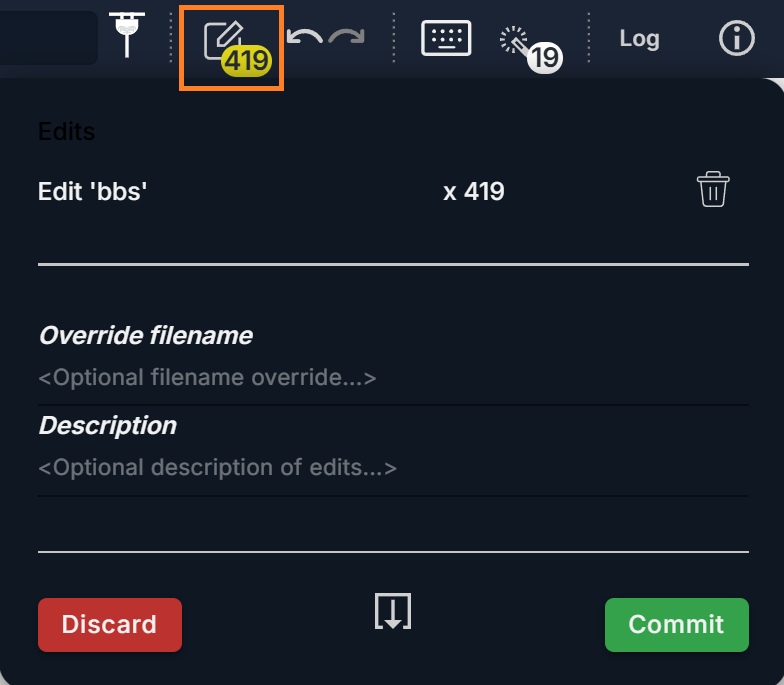
After you are done making edits, you commit a revision to save the changes you have made. To commit a revision, click
the pen icon on upper right corner of the Dashboard. A dialog containing all of your edits will pop up,
with edits separated into various categories. You can discard individual categories of edits by clicking the trash can
next to it or click Discard button to discard all edits. You can optionally specify a file name and supply a short
description for the revision, then click Commit to save it.
Python
In Python, revision Tables can be the result of various operations such as adding data, filtering, subsetting and
other transformations, stored as sparse modifications or descriptions of the changes to be applied.
To add a column to your dataset, use tlc.Table.add_column().
import tlc

table = tlc.Table.from_dict({"a": [1, 2, 3]})

column_added_table = table.add_column({"b": [4, 5, 6]})
To remove a column from your dataset, use
tlc.Table.delete_column().
import tlc

table = tlc.Table.from_dict({"a": [1, 2, 3], "b": [4, 5, 6]})

column_deleted_table = table.delete_column("b")
To delete several columns with a single operation, use
tlc.Table.delete_columns().
import tlc

table = tlc.Table.from_dict({"a": [1, 2, 3], "b": [4, 5, 6], "c": [7, 8, 9]})

column_deleted_table = table.delete_columns(["b", "c"])
To concatenate two Tables, use tlc.Table.join_tables().
Deleting rows can be done by specifying a set of indices to delete to
tlc.Table.delete_rows().
There are several methods available to set, get and edit full value map and value map items. The following are available for full value maps:
To work on the individual entries of a value map:
To filter rows based on certain criteria, create a FilteredTable and provide a FilterCriterion.
import tlc

table = tlc.Table.from_dict({"a": [6, 7, 8, 9, 10, 11]})

# Include only the rows where "a" is in [7, 10] (inclusive)
filtered_table = tlc.FilteredTable(
    input_table_url=column_added_table,
    filter_criterion=tlc.NumericRangeFilterCriterion(
        attribute="a",
        min_value=7,
        max_value=10,
    ),
)
To subset your table, use
# Keep 75% of the input data
subset_table = tlc.SubsetTable(
    input_table_url=column_added_table,
    range_factor_min=0.0,
    range_factor_max=1.0,
    include_probability=0.75,
)
A squashed Table is the result of copying the data and schema of another Table, but where all lineage is merged.
This is useful to create a Table that is independent of the parent Tables.
import tlc

table = tlc.Table.from_dict({"a": [1, 2, 3]}).add_column({"b": [4, 5, 6]})

squashed_table = table.squash(output_url="location/of/squashed/table")
Viewing revisions
3LC maintains an index over all known projects and objects, including tables, and how these depend on each other. This index is kept up-to-date using a background indexing system.
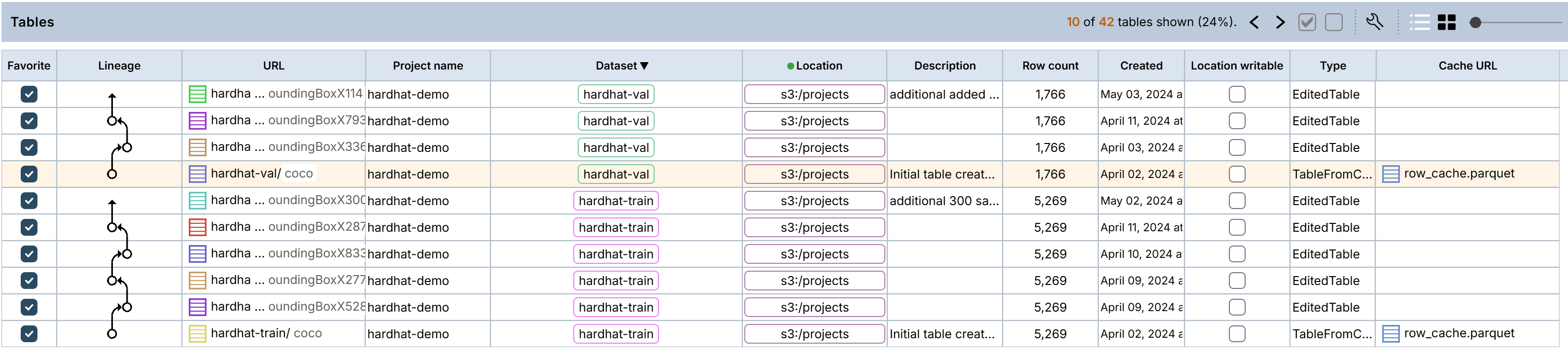
To view the revisions, for a given Project, go to the Tables panel in the Dashboard. The lineage column shows the revision relationships between each table in the project, as edges in a directed graph. To get the URL of a specific revision, copy the URL of the Table.
The Table panel contains original Tables and Table revisions, along with lineage that shows the relationship between them. Note that two Table revisions are generated in this example because edits were made to both the train and val sets.
Using revisions
When using 3LC to iteratively improve your dataset, an important step is retraining on specific revisions of your data.
To get a specific revision of your data (i.e. a specific Table), use the
tlc.Table.from_url() or
tlc.Table.from_names() methods:
import tlc

initial_url = "project_root/projects/my_project/datasets/my_dataset/tables/initial"
table = tlc.Table.from_url(initial_url)

# Or equivalently
table = tlc.Table.from_names(
    project_name="my_project",
    dataset_name="my_dataset",
    table_name="initial",
)
A specific revision of any given dataset can be requested using the
Table.revision() method, and passing either a full table_url or
simply a table_name. In both cases, 3LC will check that the requested table exists and is a descendant of the table.
revision_url = "project_root/projects/my_project/datasets/my_dataset/tables/my_revision"
revision_table = table.revision(table_url=revision_url)

# Or equivalently
revision_table = table.revision(table_name="my_revision")
The most up-to-date revision of a given dataset can be queried with the
Table.latest() method, or by passing tag="latest" to
Table.revision():
import tlc

table = tlc.Table.from_url("")

latest_table = table.latest()

# or
latest_table = table.revision(tag="latest")
The Table.revision() and Table.latest() methods rely on the 3LC indexing system to track
relationships between different versions of your files.