Collect instance segmentation metrics using Detectron2
This notebook collects instance segmentation metrics using the Detectron2 library and the COCO128 subset.
No training is performed; instead, we use a pretrained model to evaluate performance. Metrics related to bounding boxes (true positives, false positives, false negatives, iou, confidence) are collected using the BoundingBoxMetricsCollector class. The same class is used to collect instance segmentation metrics.
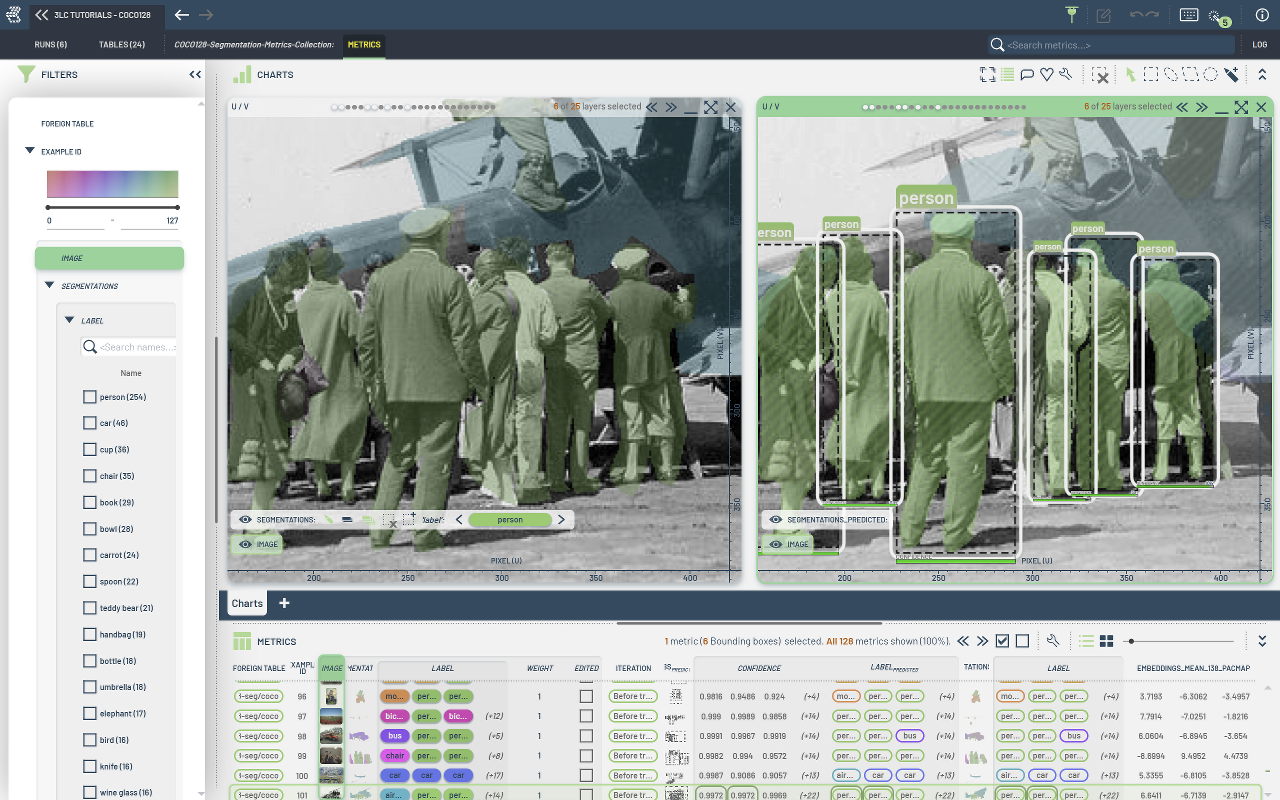
The notebook illustrates:
Metrics collection on a pretrained Detectron2 model using the COCO128 subset.
Using
BoundingBoxMetricsCollectorfor collecting object detection and segmentation metrics.Collection per-sample embeddings using
EmbeddingsMetricsCollector
Project Setup
[ ]:
PROJECT_NAME = "3LC Tutorials - COCO128"
RUN_NAME = "COCO128-Segmentation-Metrics-Collection"
DESCRIPTION = "Collect segmentation metrics for COCO128"
TRAIN_DATASET_NAME = "COCO128-seg"
TMP_PATH = "../../transient_data"
DATA_PATH = "../../data"
DETECTRON2_MODEL_CONFIG = "COCO-InstanceSegmentation/mask_rcnn_R_50_FPN_3x.yaml"
MAX_DETECTIONS_PER_IMAGE = 30
SCORE_THRESH_TEST = 0.2
MASK_FORMAT = "bitmask"
INSTALL_DEPENDENCIES = True
[ ]:
if INSTALL_DEPENDENCIES:
    # NOTE: detectron2 has no suitable prebuilt wheels for Python 3.10+, so we install from source.
    #       This requires a working C++ compiler and may take a few minutes.
    #       See https://detectron2.readthedocs.io/en/latest/tutorials/install.html for details.
    %env CC=gcc-11
    %env CXX=g++-11
    %pip install -q setuptools standard-pkg-resources wheel ninja
    %pip install -q --no-build-isolation git+https://github.com/facebookresearch/detectron2.git
    %pip install -q 3lc[pacmap]
    %pip install -q opencv-python
    %pip install -q matplotlib
Imports
[ ]:
import random

import cv2
import matplotlib.pyplot as plt
import tlc
from detectron2 import model_zoo
from detectron2.config import get_cfg
from detectron2.data import DatasetCatalog, MetadataCatalog
from detectron2.utils.logger import setup_logger
from detectron2.utils.visualizer import Visualizer

logger = setup_logger()
logger.setLevel("ERROR")
Prepare the dataset
A small subset of the COCO dataset (in the COCO standard format) is available in the ./data/coco128 directory.
It is provided while cloning our repository.
[ ]:
train_json_path = tlc.Url(DATA_PATH + "/coco128/annotations.json").to_absolute()
train_image_folder = tlc.Url(DATA_PATH + "/coco128/images").to_absolute()

assert train_json_path.exists(), "JSON file does not exist!"
assert train_image_folder.exists(), "Image folder does not exist!"
Register the dataset with 3LC
Now that we have the dataset in the COCO format, we can register it with 3LC.
[ ]:
from tlc.integration.detectron2 import register_coco_instances

register_coco_instances(
    TRAIN_DATASET_NAME,
    {},
    train_json_path.to_str(),
    train_image_folder.to_str(),
    project_name=PROJECT_NAME,
    task="segment",
    mask_format=MASK_FORMAT,
)
[ ]:
# The detectron2 dataset dicts and dataset metadata can be read from the DatasetCatalog and
# MetadataCatalog, respectively.
dataset_metadata = MetadataCatalog.get(TRAIN_DATASET_NAME)
dataset_dicts = DatasetCatalog.get(TRAIN_DATASET_NAME)
To verify the dataset is in correct format, let’s visualize the annotations of randomly selected samples in the training set:
[ ]:
import numpy as np
from detectron2.utils.file_io import PathManager

for d in random.sample(dataset_dicts, 3):
    filename = tlc.Url(d["file_name"]).to_absolute().to_str()
    if "s3://" in filename:
        with PathManager.open(filename, "rb") as f:
            img = np.asarray(bytearray(f.read()), dtype="uint8")
            img = cv2.imdecode(img, cv2.IMREAD_COLOR)
    else:
        img = cv2.imread(filename)
    visualizer = Visualizer(img[:, :, ::-1], metadata=dataset_metadata, scale=0.5)
    out = visualizer.draw_dataset_dict(d)
    out_rgb = cv2.cvtColor(out.get_image(), cv2.COLOR_BGR2RGB)
    plt.imshow(out_rgb[:, :, ::-1])
    plt.title(filename.split("/")[-1])
    plt.show()
Start a 3LC Run and collect bounding box evaluation metrics
[ ]:
[ ]:
cfg = get_cfg()

cfg.merge_from_file(model_zoo.get_config_file(DETECTRON2_MODEL_CONFIG))
cfg.MODEL.WEIGHTS = model_zoo.get_checkpoint_url(DETECTRON2_MODEL_CONFIG)
cfg.DATASETS.TRAIN = (TRAIN_DATASET_NAME,)
cfg.OUTPUT_DIR = TMP_PATH
cfg.DATALOADER.NUM_WORKERS = 0
cfg.MODEL.ROI_HEADS.BATCH_SIZE_PER_IMAGE = 512
cfg.MODEL.ROI_HEADS.NUM_CLASSES = 80
cfg.TEST.DETECTIONS_PER_IMAGE = MAX_DETECTIONS_PER_IMAGE
cfg.MODEL.ROI_HEADS.SCORE_THRESH_TEST = SCORE_THRESH_TEST
cfg.MODEL.DEVICE = "cuda"
cfg.DATALOADER.FILTER_EMPTY_ANNOTATIONS = False
cfg.INPUT.MASK_FORMAT = MASK_FORMAT

config = {
    "model_config": DETECTRON2_MODEL_CONFIG,
    "test.detections_per_image": MAX_DETECTIONS_PER_IMAGE,
    "model.roi_heads.score_thresh_test": SCORE_THRESH_TEST,
    "input.mask_format": MASK_FORMAT,
}

run.set_parameters(config)
[ ]:
from detectron2.engine import DefaultTrainer
from tlc.integration.detectron2 import BoundingBoxMetricsCollector, MetricsCollectionHook

trainer = DefaultTrainer(cfg)

# Define Embeddings metrics
layer_index = 138  # Index of the layer to collect embeddings from
embeddings_metrics_collector = tlc.metrics.EmbeddingsMetricsCollector(layers=[layer_index])

predictor = tlc.metrics.Predictor(trainer.model, layers=[layer_index])

bounding_box_metrics_collector = BoundingBoxMetricsCollector(
    classes=dataset_metadata.thing_classes,
    label_mapping=dataset_metadata.thing_dataset_id_to_contiguous_id,
    save_segmentations=True,
)

metrics_collection_hook = MetricsCollectionHook(
    dataset_name=TRAIN_DATASET_NAME,
    metrics_collectors=[bounding_box_metrics_collector, embeddings_metrics_collector],
    collect_metrics_before_train=True,
    predictor=predictor,  # Needs to be used for embeddings metrics
)

trainer.register_hooks([metrics_collection_hook])
trainer.resume_or_load(resume=False)
trainer.before_train()
[ ]:
val_table = tlc.Table.from_url(
    dataset_metadata.get("latest_tlc_table_url")
).url  # Get the last revision of the val table

url_mapping = run.reduce_embeddings_by_foreign_table_url(
    val_table,
    method="pacmap",
    n_components=3,
    n_neighbors=5,
)
[ ]: