3LC Object Service Deployment Guide
The 3LC Object Service provides a REST API used by the 3LC Dashboard to access your ML training data and 3LC projects. There are therefore two fundamental requirements when running the Object Service - it must be able to access your data, and it must be accessible to the Dashboard running in your browser. There are many different configurations that can be used to meet those requirements.
Before we go through the Object Service deployment options themselves, we need to go over some relevant concepts, terms, and configuration options.
Additional background on the 3LC components and how they work
See this page for a high-level description of the 3LC components and a diagram showing how they are connected.
The Object Service is configured to index the data you want to then explore in the 3LC Dashboard as Projects, Tables, and Runs.
Local vs. Remote
Throughout the discussion of Object Service deployment options, we will use the terms local and remote to characterize the connection to the Object Service from the viewpoint of the Dashboard, which is running in a browser on the user’s machine. That connection is basically defined by the URL the Dashboard uses when sending requests to the Object Service.
A local Object Service deployment is one where the Dashboard connects to the Object Service on the
same machine as the browser it is running in. In other words, it connects to the Object Service through the
loopback address (i.e. 127.0.0.1 or localhost).
A remote Object Service deployment is one where the Dashboard connects to the Object Service via a remote URL to a different machine from the browser it is running in.
Reverse Proxy and TLS Termination
Setting up a remote Object Service deployment requires the use of a reverse proxy that does two things. First, it provides a URL entrypoint for the Object Service, which the Dashboard running in a browser on the user’s machine can connect to. Second, it performs TLS termination (i.e. SSL termination) that allows the Dashboard to make requests over HTTPS and the Object Server to process them over HTTP.
Let’s break that down. The Dashboard is at its heart a web page whose content (HTML and JavaScript) is served over HTTPS (e.g. https://dashboard.3lc.ai in the Default deployment). HTTPS uses TLS to encrypt traffic for secure transport.
In order to maintain security, modern browsers generally do not allow web pages served over HTTPS (like the Dashboard) to make direct requests to HTTP endpoints because they do not perform TLS encryption. This is called accessing mixed content, and cannot be done without explicitly configuring the browser to allow it, which is not recommended. The one exception to the rule is that browsers generally do allow requests to HTTP endpoints running on the same machine as the browser without special configuration.
Recall that the Object Service provides a REST API used by the Dashboard to access your ML training data and 3LC projects. The Object Service serves its REST API endpoints over HTTP (not HTTPS). As indicated above, for a local Object Service deployment - where the Dashboard makes requests to the Object Service running on the same machine as the browser - the Dashboard is allowed to make those requests over HTTP. This is precisely a situation that qualifies for the exception to the rule described above.
But for a remote Object Service deployment, where the Object Service is running at some remote URL on some other machine, the Dashboard would not be allowed to make direct requests to it using the insecure HTTP protocol.
The solution is to run a reverse proxy in front of the Object Service, accessible over HTTPS at the remote URL, that performs TLS termination and serves as an intermediary between the Dashboard and the Object Service. The Dashboard is allowed to send HTTPS requests to the reverse proxy. The reverse proxy decrypts those requests and forwards them to the Object Service over HTTP, and it encrypts responses on their way back out to the Dashboard.
A dedicated reverse proxy server (e.g. Nginx) may be used, but so can other components like cloud service load balancers, which often offer reverse proxying and TLS termination alongside other features.
Reverse proxies that provide TLS termination generally require the use of DNS configuration and certificates. Those things may be managed directly or through tooling for on-prem servers. Cloud providers offer related services when working with cloud VMs.
Multiple Users for the Object Service
One of the primary reasons to use a remote Object Service deployment is to allow multiple users to access the same Object Service instance. That is possible because they can all connect their Dashboards to the same remote URL for the Object Service (or really, the reverse proxy sitting in front of it), whereas in a local Object Service deployment, each user’s Dashboard can only connect to the Object Service running on the same machine as their individual Dashboard.
When using the 3LC default deployment, an API key is required to run the Object Service in all scenarios, and a single instance of the Object Service may be accessed by all users in the same workspace. When using the 3LC Enterprise On-Prem solution, a license key is required to start the Object Service in all scenarios, and a single instance of the Object Service may be accessed by all users in the enterprise.
Note that what is described above - multiple users accessing the same Object Service instance - is an advanced scenario limited to the remote Object Service deployment options. By far, the more common case is to have each user accessing a unique Object Service instance that is running for (and likely started by) them, which is something that is possible in all local and remote Object Service deployments.
Dashboard Configuration
If you do not explicitly specify otherwise, the Dashboard running in the browser assumes a default local Object Service
deployment, with the Object Service accessible on the same machine at its default port, i.e. http://127.0.0.1:5015.
Sometimes that assumption does not hold, for example when running the Object Service locally but on a non-default port, or using any remote Object Service deployment with the Object Service running at a remote URL. In such cases, you will have to specify the Object Service URL to the Dashboard explicitly, which can be done in one of two ways.
Settings Dialog
The URL of the Object Service can be set through the Dashboard’s settings dialog by changing the Object Service URL
under Connection.

Query Parameter
It is also possible to set the URL of the Object Service as a query parameter to the Dashboard. This approach is well suited to scripting and applications that automate the launching of the Object Service.
The format of the query parameter is:
https://dashboard.3lc.ai?object_service=<url>
Note that the value of the query-parameter must be URL encoded. This applies to characters that typically appears in
URLs, such as / and :. An example of an encoded URL is:
https://dashboard.3lc.ai?object_service=https%3A%2F%2F192.168.0.10%3A5015
Object Service Deployment Options
Below we will explore various Object Service deployment options, discuss why you might choose them, and provide instructions on setting them up.
Note that all of the Object Service deployment options apply regardless of which higher-level 3LC deployment option you use. In the examples below, the Default deployment’s Dashboard URL (https://dashboard.3lc.ai) will be used because it is constant, whereas the Enterprise On-Prem Dashboard URL varies with installation.
Local - Direct
This is the simplest setup where you run the Object Service on your local machine, often with the default settings so that the Dashboard in your browser connects to it automatically.
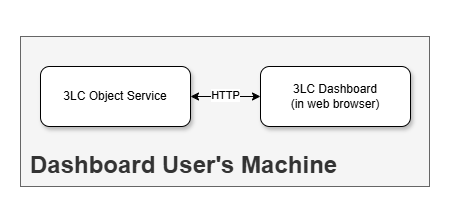
Example use cases:
An individual data scientist performs the entire 3LC loop - training, data modification using 3lc, retraining - on their local machine.
Multiple users use 3LC on their individual local machines to work with ML training data and 3LC projects stored in a shared location they can all access; ML training and 3LC metrics capture may be done on another machine (e.g. one with a dedicated powerful GPU).
Such scenarios occur most often for non-commercial 3LC use, for initial assessment of 3LC within enterprises, and sometimes for ongoing use within organizations where all 3LC users have direct access to the necessary data.
Summary:
Deployment type |
Local |
Requires Reverse Proxy with TLS Termination? |
No |
ML data and 3LC project accessibility |
Must be accessible from user’s local machine |
Multiple users per Object Service instance? |
No, single user on their local machine |
Dashboard configuration |
Override Object Service URL only if it is not running on the default port 5015 |
Usage:
On the local machine
Run the Object Service:
3lc serviceRun the Dashboard in a browser
Local - SSH Tunnel
It is possible to run the Object Service on a remote machine and use SSH on your local machine to do port forwarding such that the Dashboard running in a browser on your local machine is transparently redirected to the remote machine through its connection to your local machine. This is called SSH tunneling.
Even though the Object Service is technically running on a different machine than the one running the browser with the Dashboard, that fact is transparent to the browser. Requests are still made to the local loopback address, so from the Dashboard’s point of view this is still a local Object Service deployment.
Using SSH tunnelling to connect to a remote machine is usually done on a temporary, ad-hoc basis with a remote machine that is inside the same network as the user’s local machine. More robust solutions are available for longer-lived connections and/or connections involving machines outside the network.
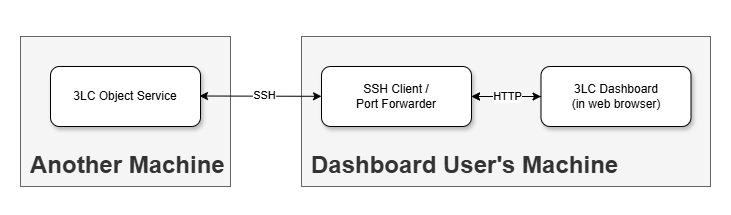
Example use cases:
An individual data scientist uses a remote machine with a powerful dedicated GPU to do ML training - with the ML data and 3LC metrics captured during training stored on that remote machine - but runs the Dashboard in the browser on their local machine.
The Object Service runs on a dedicated enterprise machine with special access to ML data storage that individual users are not allowed to copy data from or mount locally, and one or more 3LC users run the Dashboard in the browsers on their local machines.
Summary:
Deployment type |
Local |
Requires Reverse Proxy with TLS Termination? |
No |
ML data and 3LC project accessibility |
Must be accessible from remote machine where the Object Service is running and the local machine is port forwarding to |
Multiple users per Object Service instance? |
No, single user on their local machine |
Dashboard configuration |
Override Object Service URL only if the SSH tunnel is not connected through the default port 5015 |
Usage:
On the remote machine with access to the ML data and 3LC projects
Run the Object Service:
3lc serviceOn the local machine
Create an SSH tunnel (may need to be tweaked depending on SSH implementation):
ssh -L 5015:localhost:5015 <user>@<remote-machine>
Run the Dashboard in a browser
 VS Code / Cursor automatic port forwarding
When using VS Code or Cursor logged in to a remote machine with the
Remote - SSH extension, port
forwarding is automatically set up when you launch the Object Service with 3lc service. A popup will appear in the
corner of the screen which confirms the port forwarding.
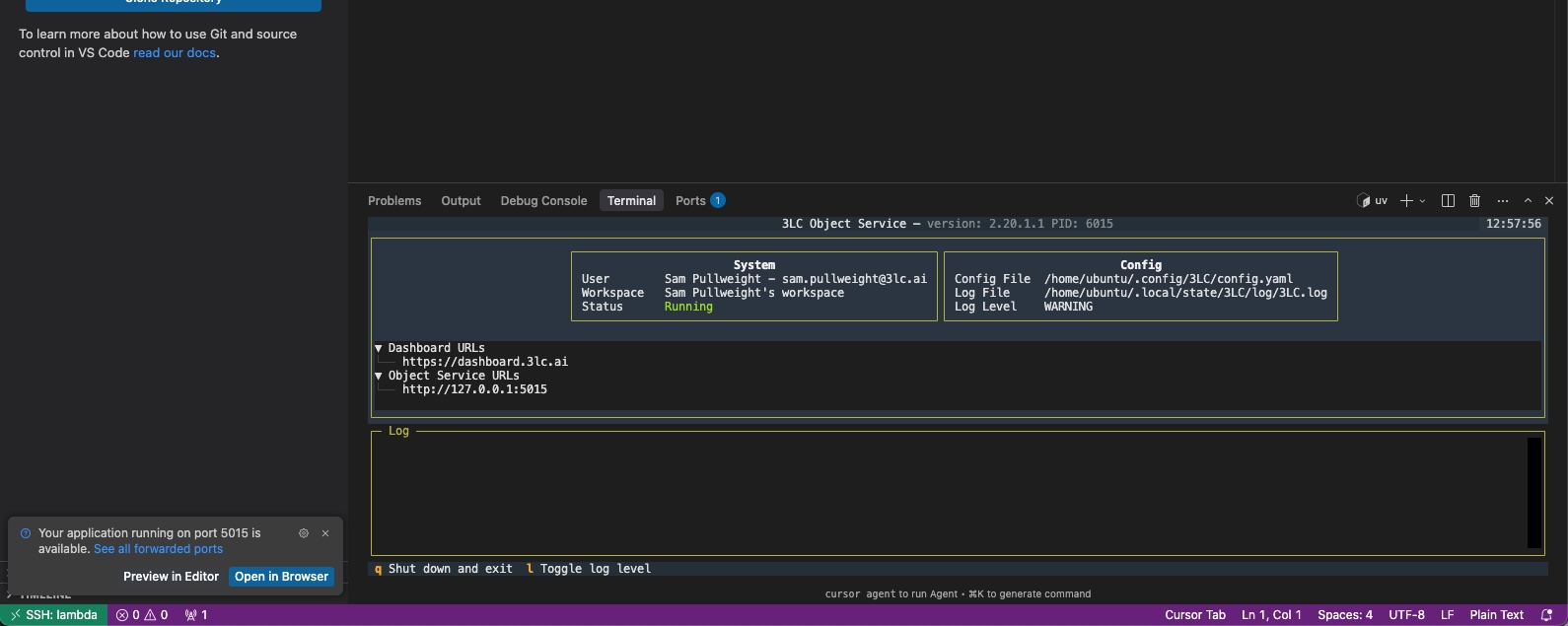
Use the Ports panel to manage the forwarded address. Make sure to connect to the forwarded address in the Dashboard.
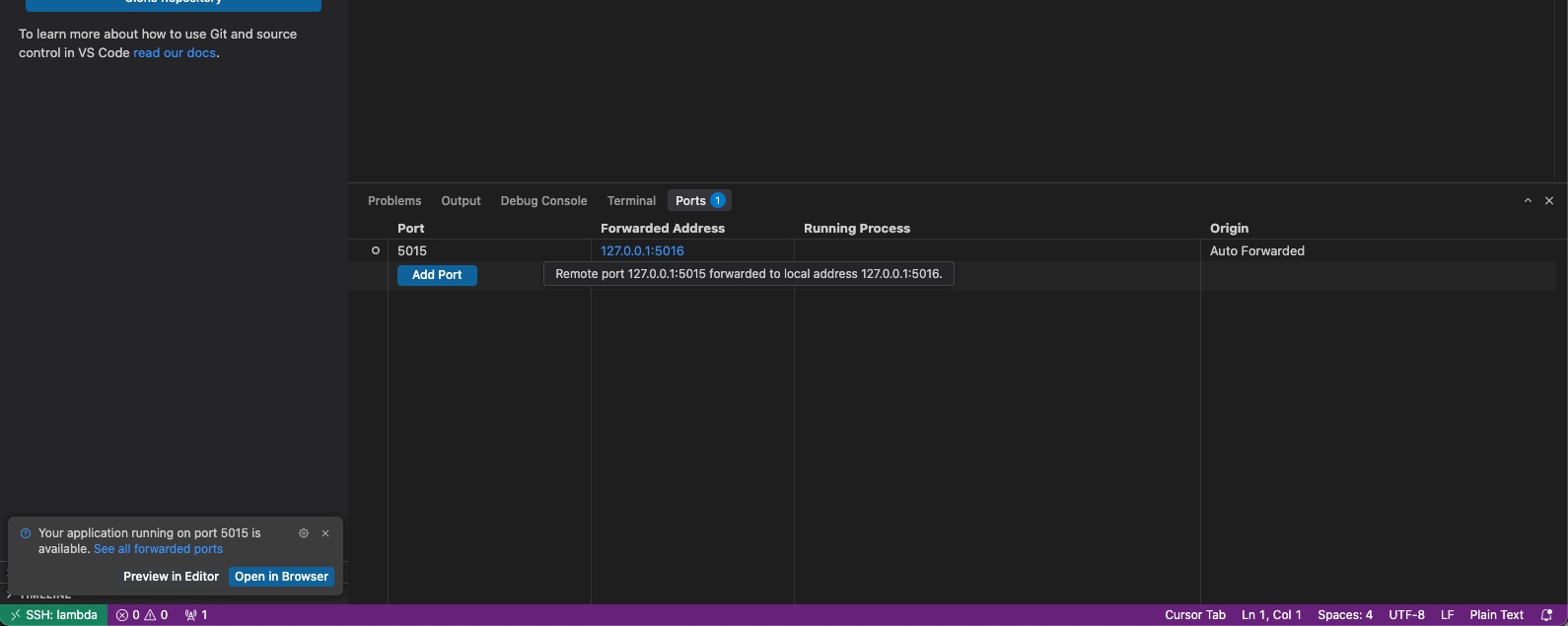
To learn more about SSH tunnelling with the Remote - SSH extension, see the Remote - SSH documentation.
Remote - External Reverse Proxy Service
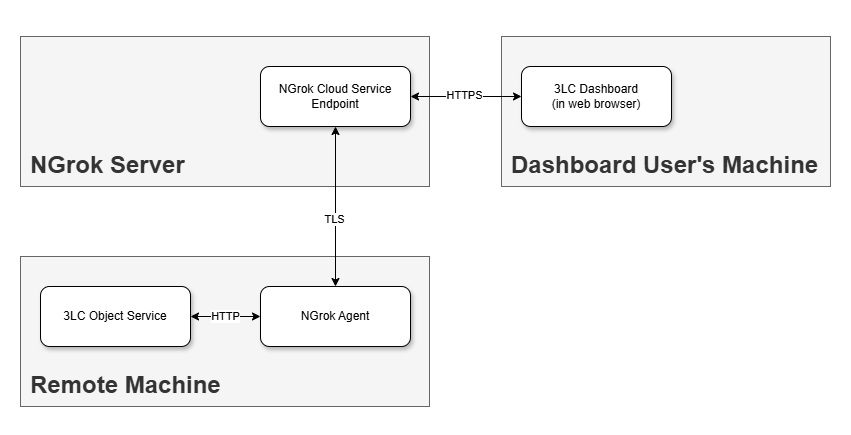
It is possible to run the Object Service on a remote computer that is not part of the local network but instead only available over the public internet, and to connect the Dashboard to it by using an external reverse proxy service to assign it a public (often temporary) URL. Note that even when this URL is public, 3LC implements authentication to ensure that communication between the Dashboard and Object Service is secure.
The Object Service has built-in support for the external proxy service NGrok, and others can be used with additional configuration.
Example use cases:
A data scientist runs ML training in a hosted Jupyter environment such as Google Colab or AWS SageMaker, and the ML data and/or 3LC projects they want to analyze in the Dashboard are only accessible in the storage belonging to the hosted Jupyter environment.
Hosted Jupyter environments
Before using an external reverse proxy service to provide access to the Object Service running inside a hosted Jupyter environment, make sure that the terms and conditions of your account allow the use of such reverse proxies.
Summary:
Deployment type |
Remote |
Requires Reverse Proxy with TLS Termination? |
Yes but provided by service, e.g. NGrok |
ML data and 3LC project accessibility |
Must be accessible from remote machine where the Object Service is actually running. e.g. the hosted Jupyter notebook environment |
Multiple users per Object Service instance? |
Maybe, technically possible to have multiple users connect through remote URL |
Dashboard configuration |
Override Object Service URL to specify the URL provided by the external reverse proxy service |
Resources:
Google Colab example on GitHub
AWS SageMaker example on GitHub
Usage for NGrok:
On the remote machine with access to the ML data and 3LC projects (e.g. the hosted Jupyter environment)
Install 3LC Python package with NGrok extra:
pip install 3lc[pyngrok]
Sign up for NGrok account at ngrok.com.
NGrok offers both free and paid accounts, depending on your usage needs.
Important
NGrok is a third-party service which requires the user to sign up separately and which has its own terms and conditions. Please review these carefully before using NGrok.
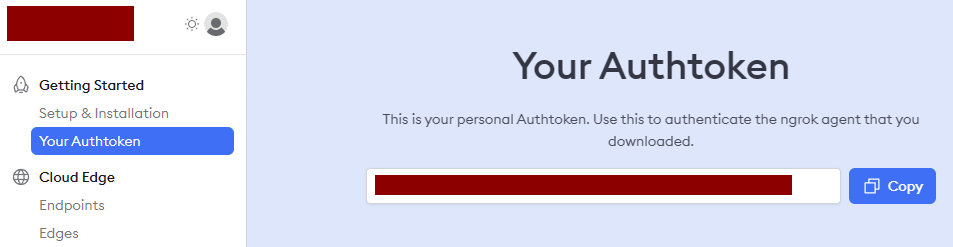
Copy NGrok Authtoken
Log in to your NGrok account and copy the Auth Token from the NGrok Dashboard.
Set
NGROK_TOKENenvironment variableThis must be done prior to launching the Object Service.
export NGROK_TOKEN=<ngrok token>
set NGROK_TOKEN=<ngrok token>
Launch the Object Service using the
--ngrokoption:3lc service --ngrok
The Object Service will now set up an NGrok endpoint for connecting to the Object Service, and it will output the URL for the endpoint that can be used for the Dashboard:
3LC Object Service - Version: 2.3, PID: 1408 (Use Ctrl-C to exit.)
Platform: Windows 10.0.22631 (AMD64), Python: 3.11.7
Object Service URL: http://127.0.0.1:5015
Dashboard URL: https://dashboard.3lc.ai?object_service=https%3A%2F%2Fdb8c-62-92-224-122.ngrok-free.app
On the local machine
Run the Dashboard in a browser
Configure the Object Service URL in the Dashboard. The easiest way to do that in this case is just to open a browser and navigate to the Dashboard URL output when starting the Object Service (ending with
ngrok-free.appin the example above).
Remote - Internal Reverse Proxy Server
Advanced
This scenario can be complex and involves network infrastructure, so it may require the cooperation and expertise of your system administrator to set up correctly.
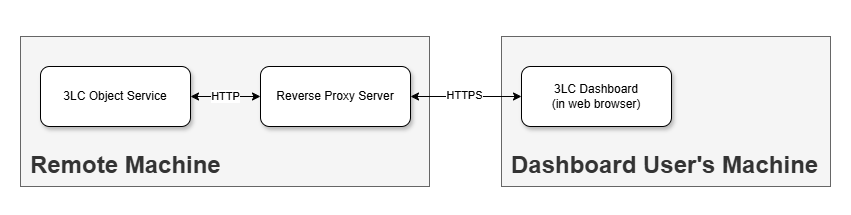
This remote Object Service deployment option involves running an Object Service on a centralized remote machine that your organization manages, as well as running a reverse proxy in front of it to provide TLS termination and a remote URL that can be used to connect to the Object Service over HTTPS.
Example use cases:
The Object Service runs on an on-prem server with an Nginx reverse proxy running in front of it serving as a reverse proxy and performing TLS termination using a Let’s Encrypt certificate.
The Object Service runs on an AWS EC2 instance with an Application Load Balancer running in front of it serving as a reverse proxy and performing TLS termination using a certificate from AWS Certificate Manager.
An enterprise data scientist uses a management tool to provision an Object Service instance that spins up on-demand in a Docker container running on the enterprise Kubernetes cluster, with an ingress controller serving as a reverse proxy and performing TLS termination using a self-signed certificate.
Resources:
3lc-deployment-examples on GitHub:
Demonstrates sample setup using Docker alone or with Kubernetes to run various 3LC components
Summary:
Deployment type |
Remote |
Requires Reverse Proxy with TLS Termination? |
Yes, provided by internal reverse proxy |
ML data and 3LC project accessibility |
Must be accessible from remote machine where the Object Service is actually running |
Multiple users per Object Service instance? |
Yes, easy to support various options where multiple users connect to the same remote URL |
Dashboard configuration |
Override Object Service URL to specify remote URL of reverse proxy running in front of Object Service |
Usage:
On the remote machine with access to the ML data and 3LC projects where you will run the Object Service
Run the Object Service
3lc serviceRun a reverse proxy that provides TLS termination and forwards to the Object Service (details vary based on reverse proxy solution)
On the local machine
Run the Dashboard in a browser
Configure the Object Service URL in the Dashboard.