Enterprise On-Prem
The Enterprise On-Prem deployment can be used for running 3LC in isolated environments with restricted access to the public internet. There are no user accounts or workspaces, and 3LC usage is authenticated using a license key. The 3LC Hub Frontend Server and 3LC Dashboard Server are hosted internally in the enterprise infrastructure.
Tip
3LC Enterprise On-Prem is a different product from the one available by the default installation. Please contact the Sales Team if you are interested in Enterprise On-Prem or in discussing other types of customization.
If you are looking for the default 3LC solution that uses services provided by 3LC Inc. to manage user accounts and workspaces and to serve the Hub and Dashboard, please see Default deployment.
Architecture
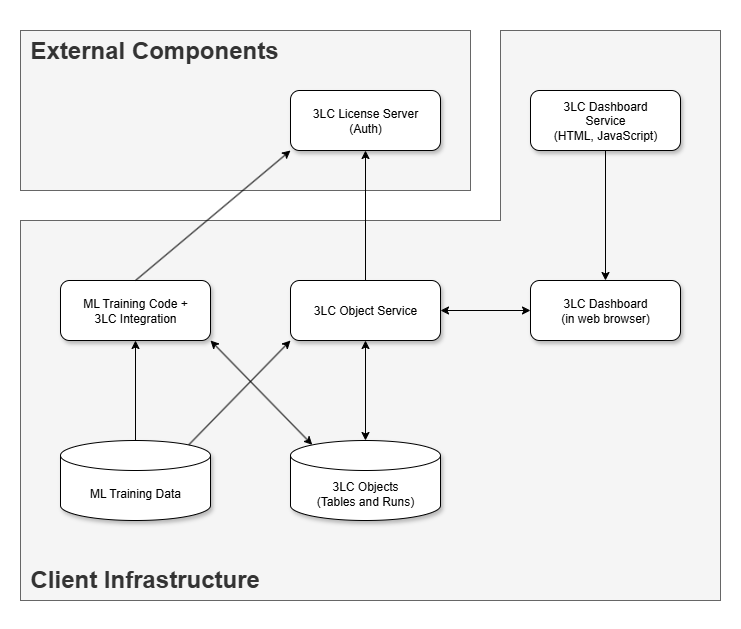
Installation
The Enterprise On-Prem deployment requires four packages, all installed from the 3LC private package index using
credentials provided by 3LC. Exchange the credential placeholders (USERNAME and PASSWORD) below before running the
commands.
Prerequisites
To install 3LC Enterprise On-Prem, you should have been provided the following through an agreement with 3LC, Inc.
Credentials to access our private Python repository. These are in the form of a user-name and a password. From here on these are called
USERNAMEandPASSWORDrespectively.A license key, hereafter called
LICENSE_KEY
uv pip install --index-url https://<USERNAME>:<PASSWORD>@pypi.3lc.ai/repositories/releases --extra-index-url https://pypi.org/simple 3lc-enterprise
pip install --index-url https://<USERNAME>:<PASSWORD>@pypi.3lc.ai/repositories/releases --extra-index-url https://pypi.org/simple 3lc-enterprise
3lc-enterprise pulls in 3lc, 3lc-dashboard, 3lc-compute, and 3lc-hub-frontend as dependencies. After
installation the following commands are available: 3lc service (Object Service), 3lc-compute (Compute Service),
3lc-hub-frontend (Hub Frontend Server), and 3lc-dashboard (Dashboard Server).
Environment
All four services share a common set of environment variables:
export TLC_LICENSE=<LICENSE_KEY>
export TLC_OBJECT_SERVICE_AUTH_SECRET=<AUTH_SECRET>
set TLC_LICENSE=<LICENSE_KEY>
set TLC_OBJECT_SERVICE_AUTH_SECRET=<AUTH_SECRET>
TLC_LICENSE is your license key (or path to a file containing it) — setting it automatically enables enterprise
licensing. See License Key for details. TLC_OBJECT_SERVICE_AUTH_SECRET is a strong,
random string shared by all services to secure inter-service communication — see
Secure Communication.
Starting the Services
Start each service in a separate terminal (or as background processes), with the environment variables above set in each:
Object Service
3lc serviceCompute Service
3lc-compute --host 0.0.0.0
--host 0.0.0.0binds to all interfaces so the Hub Frontend can reach it (the default is127.0.0.1).Hub Frontend Server
3lc-hub-frontend
Dashboard Server
3lc-dashboard
Each service prints its URL on startup. Open the Hub Frontend URL in a browser to access the Hub.