Create a Semantic Segmentation Table from Pascal VOC 2012
Ingest the Pascal VOC 2012 segmentation set into 3LC tables — a 21-class semantic segmentation problem (background plus 20 objects) that steps up from the 3-class Oxford Pets example.
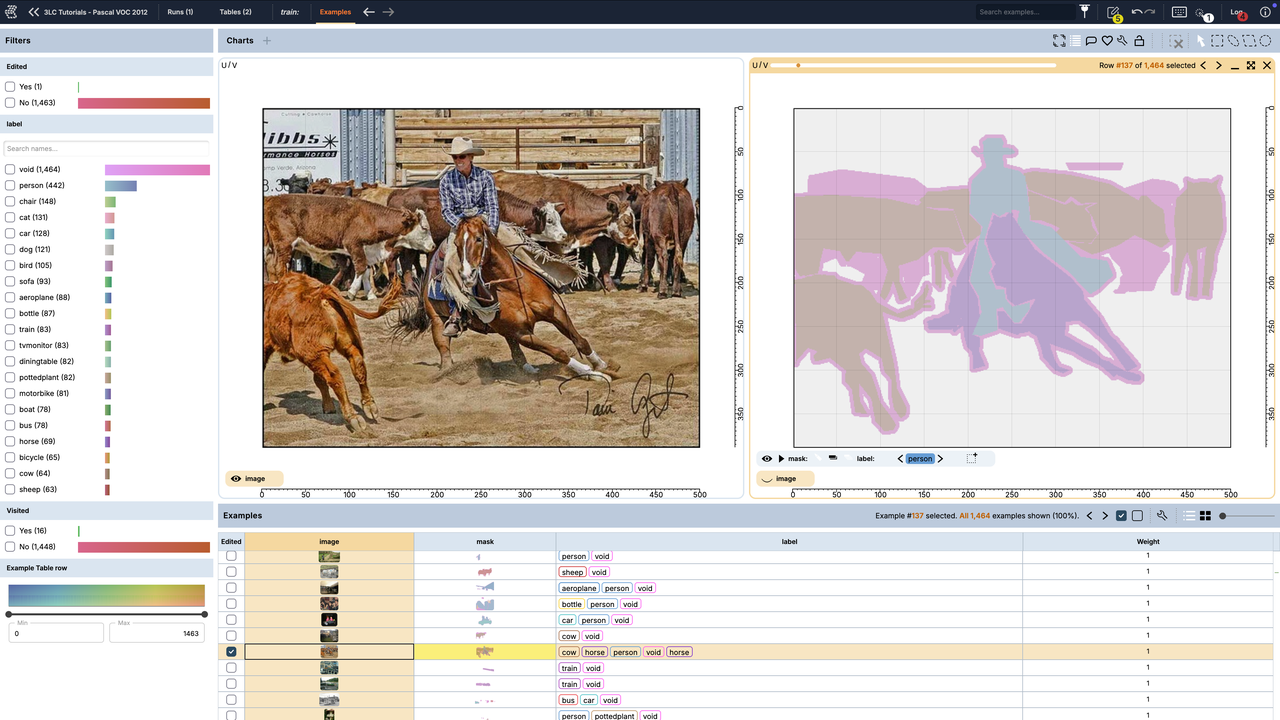
Pascal VOC 2012 stores each segmentation as a paletted PNG whose pixel indices are the class ids (0 = background, 1..20 = objects, 255 = the void boundary). That means no label remapping is needed — np.asarray of the PNG is the dense label map. We author the tables with the documented front door Table.from_semantic_segmentation(...), which takes the images and masks directly. background is recorded in the column schema’s
metadata (not the value map) and omitted from per-row storage as the implicit fill; void is tagged and excluded from metrics.
This is the ingest half of a pair: huggingface-pascal-voc-mask2former-finetuning fine-tunes a Mask2Former model on the tables created here.
Project setup
[ ]:
# Parameters
PROJECT_NAME = "3LC Tutorials - Pascal VOC 2012"
DATASET_NAME = "pascal-voc-2012"
TABLE_NAME = "train"  # the train table; the val table is written as "val"
VAL_TABLE_NAME = "val"
DOWNLOAD_PATH = "../../transient_data"  # dataset root; point at an existing copy to skip the download
N_TRAIN = None  # cap the train rows for a quick run; None keeps the whole train split
N_VAL = None  # cap the val rows for a quick run; None keeps the whole val split
SEED = 42
INSTALL_DEPENDENCIES = True
Install dependencies
[ ]:
if INSTALL_DEPENDENCIES:
    %pip install -q 3lc torchvision matplotlib
Imports
[ ]:
import random
from collections.abc import Sequence
from pathlib import Path

import numpy as np
import tlc
from PIL import Image
from torchvision.datasets import VOCSegmentation
Download the dataset
torchvision fetches the VOC2012 devkit. One download provides both the train and val segmentation splits. The download only runs when the data is missing — if DOWNLOAD_PATH/VOCdevkit/VOC2012/ already exists, torchvision uses it as-is and never writes (so a pre-seeded read-only cache is safe). To reuse an existing copy, point DOWNLOAD_PATH at its parent — e.g. DOWNLOAD_PATH = "~/data" when the devkit lives at ~/data/VOCdevkit/VOC2012.
Note: the official VOC host is occasionally slow or unavailable. If the download fails, fetch
VOCtrainval_11-May-2012.tarmanually and extract it underDOWNLOAD_PATHso thatDOWNLOAD_PATH/VOCdevkit/VOC2012/exists.
[ ]:
download_root = Path(DOWNLOAD_PATH).expanduser()
data_root = download_root / "VOCdevkit" / "VOC2012"
# Gate on the extracted dirs ourselves rather than passing download=True: torchvision's VOCSegmentation
# re-runs download+extract whenever download=True (it keys the skip on the .tar's md5, not the extracted
# tree), so it would re-extract — or fail on a read-only cache — even when the devkit is already here.
have_data = (data_root / "JPEGImages").is_dir() and (data_root / "SegmentationClass").is_dir()
print(
    f"Dataset cache {'HIT' if have_data else 'MISS'} at {data_root.resolve()} "
    f"({'using existing data' if have_data else 'downloading'})"
)
VOCSegmentation(root=download_root, year="2012", image_set="train", download=not have_data)
print("Dataset at", data_root.resolve())
Define the class universe
The 21 VOC classes in canonical order, plus void. Passing background and void to the front door gives them their roles: background (id 0) is recorded in the schema metadata and omitted from the value map and per-row storage (the implicit fill, rendered transparent), while void (id 255) is tagged and excluded from metrics. Downstream code reads these back rather than hard-coding ids.
[ ]:
VOC_CLASS_NAMES = [
    "background",
    "aeroplane",
    "bicycle",
    "bird",
    "boat",
    "bottle",
    "bus",
    "car",
    "cat",
    "chair",
    "cow",
    "diningtable",
    "dog",
    "horse",
    "motorbike",
    "person",
    "pottedplant",
    "sheep",
    "sofa",
    "train",
    "tvmonitor",
]
BACKGROUND_ID = 0
VOID_ID = 255

# Class universe handed to the front door: background + 20 objects + void.
SEGMENTATION_CLASSES = {**{i: name for i, name in enumerate(VOC_CLASS_NAMES)}, VOID_ID: "void"}
Locate the image/mask pairs
Only images with a segmentation annotation are ingested — the ids listed in ImageSets/Segmentation/{train,val}.txt (the official VOC segmentation split, not the larger SBD/SegmentationClassAug set). LazyMasks decodes each PNG on indexed access so we never hold all masks in memory at once.
[ ]:
def collect_samples(root: Path, split: str) -> list[tuple[Path, Path]]:
    # Pair every id in ImageSets/Segmentation/<split>.txt with its jpg + mask png.
    split_file = root / "ImageSets" / "Segmentation" / f"{split}.txt"
    if not split_file.is_file():
        raise FileNotFoundError(f"Missing segmentation split file: {split_file}")
    pairs = []
    for name in split_file.read_text().split():
        image_path = root / "JPEGImages" / f"{name}.jpg"
        label_path = root / "SegmentationClass" / f"{name}.png"
        if image_path.exists() and label_path.exists():
            pairs.append((image_path, label_path))
    return pairs


def load_mask(label_path: Path) -> np.ndarray:
    # Decode a paletted SegmentationClass PNG; its indices are the class ids directly.
    return np.asarray(Image.open(label_path), dtype=np.int32)


class LazyMasks(Sequence):
    def __init__(self, label_paths: list[Path]) -> None:
        self._label_paths = label_paths

    def __len__(self) -> int:
        return len(self._label_paths)

    def __getitem__(self, index: int) -> np.ndarray:
        return load_mask(self._label_paths[index])
Write the tables
Table.from_semantic_segmentation takes the image paths and the (lazy) masks plus the class universe and the background / void roles, and writes the table in one call.
[ ]:
def build_table(split: str, table_name: str, n_rows: int | None) -> tlc.Table:
    pairs = collect_samples(data_root, split)
    if n_rows is not None:
        random.Random(SEED).shuffle(pairs)
        pairs = pairs[:n_rows]

    images = [image_path for image_path, _ in pairs]
    masks = LazyMasks([label_path for _, label_path in pairs])

    table = tlc.Table.from_semantic_segmentation(
        images=images,
        masks=masks,
        classes=SEGMENTATION_CLASSES,
        background=BACKGROUND_ID,
        void=VOID_ID,
        project_name=PROJECT_NAME,
        dataset_name=DATASET_NAME,
        table_name=table_name,
        if_exists="overwrite",
    )
    print(f"Wrote {table_name}: {len(table)} rows -> {table.url}")
    return table


train_table = build_table("train", TABLE_NAME, N_TRAIN)
val_table = build_table("val", VAL_TABLE_NAME, N_VAL)
Inspect a sample
Reading a row back hands you a SemanticSegmentation dataclass. We overlay the mask on the image to sanity-check the alignment and the class palette.
[ ]:
import matplotlib.pyplot as plt

sample = train_table[0]
seg = sample["mask"]
present = seg.present_class_ids.tolist()
print(f"Round-trip type: {type(seg).__name__}")
print("Classes present:", [SEGMENTATION_CLASSES[c] for c in present])

image = sample["image"]  # the image column reads back as a PIL image

fig, axes = plt.subplots(1, 2, figsize=(10, 4))
axes[0].imshow(image)
axes[0].set_title("image")
axes[1].imshow(image)
axes[1].imshow(seg.mask, alpha=0.5, cmap="tab20", interpolation="nearest")
axes[1].set_title("segmentation")
for ax in axes:
    ax.axis("off")
plt.tight_layout()
plt.show()
Next steps
The train and val tables are now in your 3LC project — open the project in the 3LC Dashboard to browse the images and their 21-class segmentations.
Continue with huggingface-pascal-voc-mask2former-finetuning to fine-tune a Mask2Former model on these tables and collect per-sample predictions and IoU back into a 3LC Run.